New workspace? Follow chapters 1–12 in order. Already operating? Start with the daily queue, broadcasts, support handoffs or coaching chapter you need. Every chapter ends with a concrete outcome so progress is measurable, not merely complete.
START HERE
Your first 60 minutes in Entergram
Build one useful operating loop before inviting the whole team: connect an account, remove noise, add three fields, save one view and work twenty real chats.
The minimum viable workspace
- Connect one Telegram account and wait for the initial chat sync to finish.
- Exclude bots, dead groups and personal conversations that should not appear in the CRM or analytics.
- Create three custom columns: Stage (Select), Owner (Select) and Next step (Date).
- Apply those fields to twenty real chats. This validates the schema before you scale it.
- Filter to the conversations that matter today and save the result as My morning queue.
- Only then invite teammates, share the view and set workspace permissions.
What lives where
| Object | Use it for | Source of truth |
|---|---|---|
| Telegram account | The identity that reads and sends messages | Telegram session connected to a seat |
| Chat | The customer or group conversation | Telegram, enriched by Entergram |
| Custom field | Stage, owner, segment, value or next step | Entergram workspace |
| Ticket | Assignable work that must be tracked to resolution | Entergram Tickets |
| View | A repeatable table or board configuration | Personal or shared workspace view |
| Telegram folder | Personal inbox organization that also appears in Telegram | Telegram |
FOUNDATION
Accounts, seats and permissions
A seat is a person in the Entergram workspace. A Telegram account is a connected identity. Connect accounts only to the seats that are authorized to operate them.
Choose the account model before inviting people
| Model | How to configure it | Best for |
|---|---|---|
| Personal account | Each member connects their own Telegram login to their seat. | Sales, partnerships and founder-led outreach |
| Shared service account | The same Telegram login is deliberately connected to each operating seat. | Support, community and shared coverage |
| Operations monitor | Only authorized employee accounts are connected to a manager seat. | Coaching, QA and regulated review |
Verify the connection and member limits
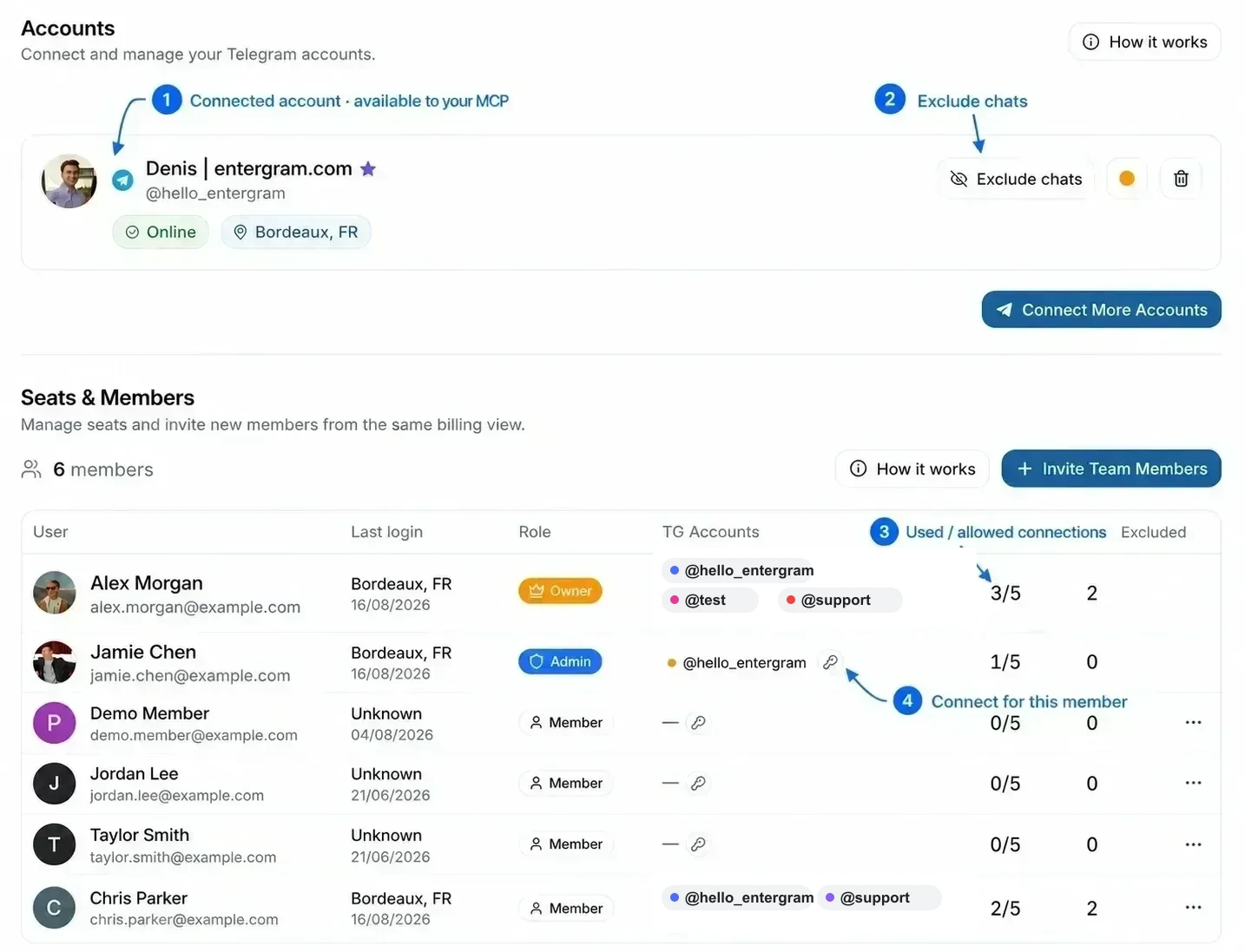
- Confirm the account shows Live Sync Ready.
- Use Exclude chats to remove conversations from CRM, analytics and contact syncing.
- Read TG Limit as used / allowed connections, not as a message limit.
- Set member permissions before enabling ticket editing, message deletion or exclusion management.
DAILY OPERATIONS
Run the daily conversation queue
The raw chat list is not the workflow. First reduce noise, then choose only the columns and conversations needed for the job.
Read the Messages table as an operating surface
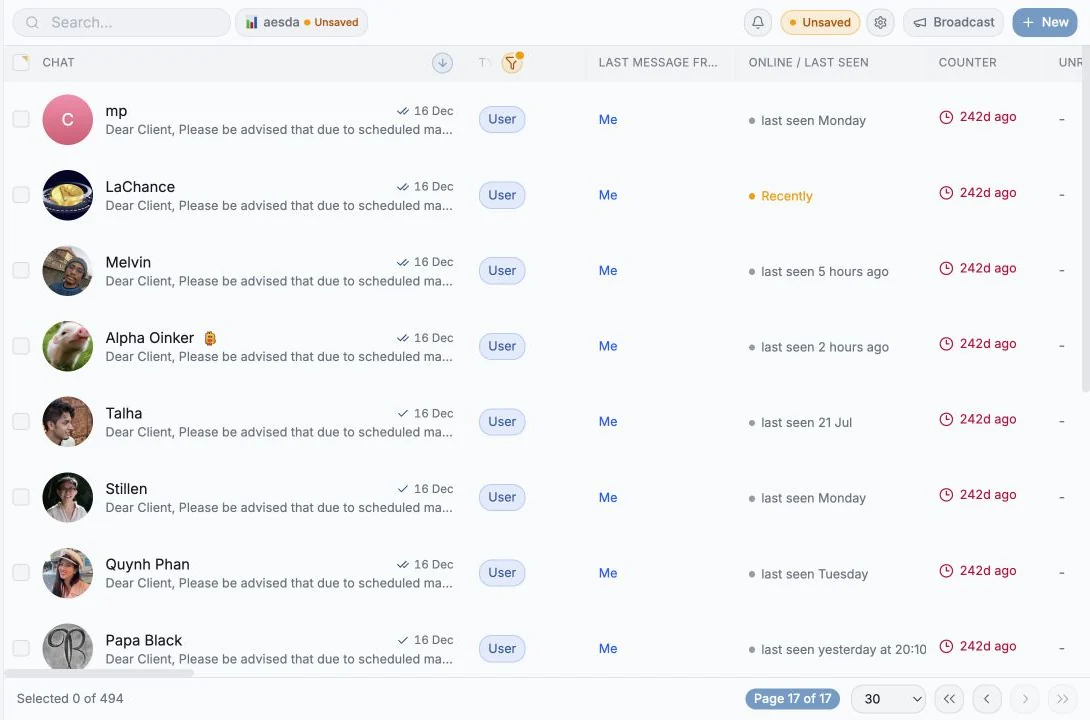
- Use Accounts to decide which Telegram identities are in scope.
- Use chat type and folder filters to remove irrelevant conversations.
- Keep time-sensitive columns such as Last message, Unread count and Counter visible.
- Exclude chats that should never influence customer analytics.
The daily inbox hygiene rule
| Signal | Operator action |
|---|---|
| Unread and customer waiting | Reply, assign or create a ticket |
| No owner | Assign an owner before the conversation leaves the morning queue |
| No next step | Add a date or reminder |
| Not business-relevant | Exclude it instead of repeatedly filtering it out |
CRM SETUP
Create columns, labels and a simple pipeline
Custom columns move operating context out of memory and spreadsheets. Start with fields that change a decision, filter or handoff.
Create the first column
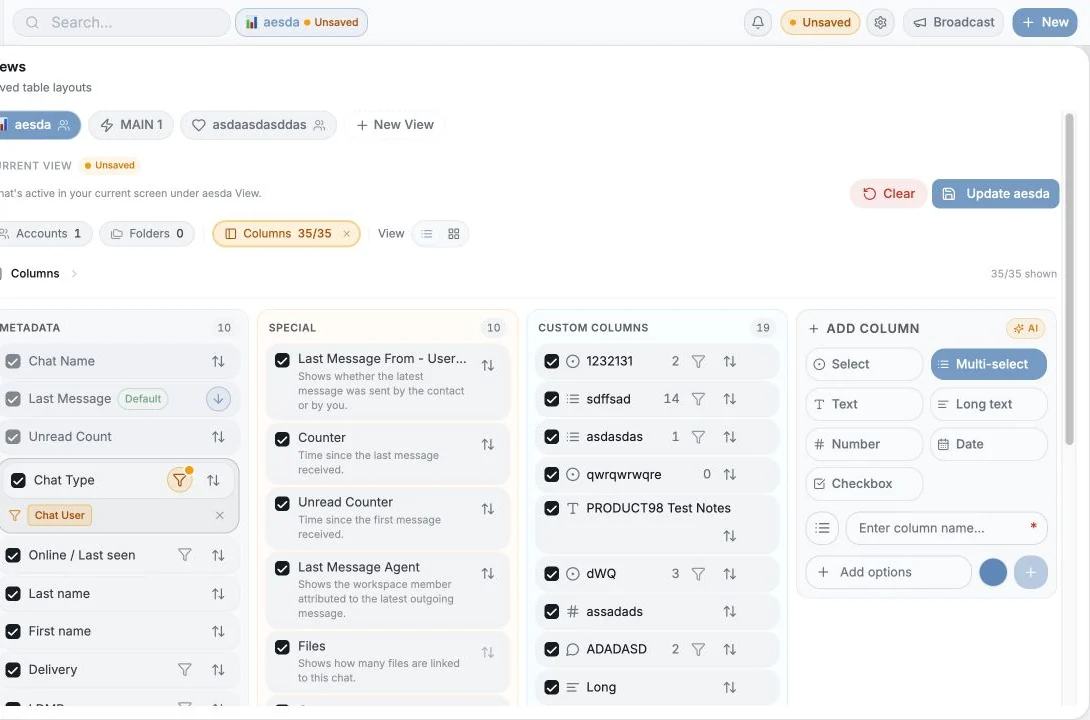
- Open Messages → Columns.
- Choose Add column and name it Stage.
- Select the Select type so the values can be filtered, grouped and used as board lanes.
- Add a short option list such as New, Qualified, Proposal, Won and Lost.
- Save, then fill the field for twenty live chats before creating another column.
Apply labels to many chats at once
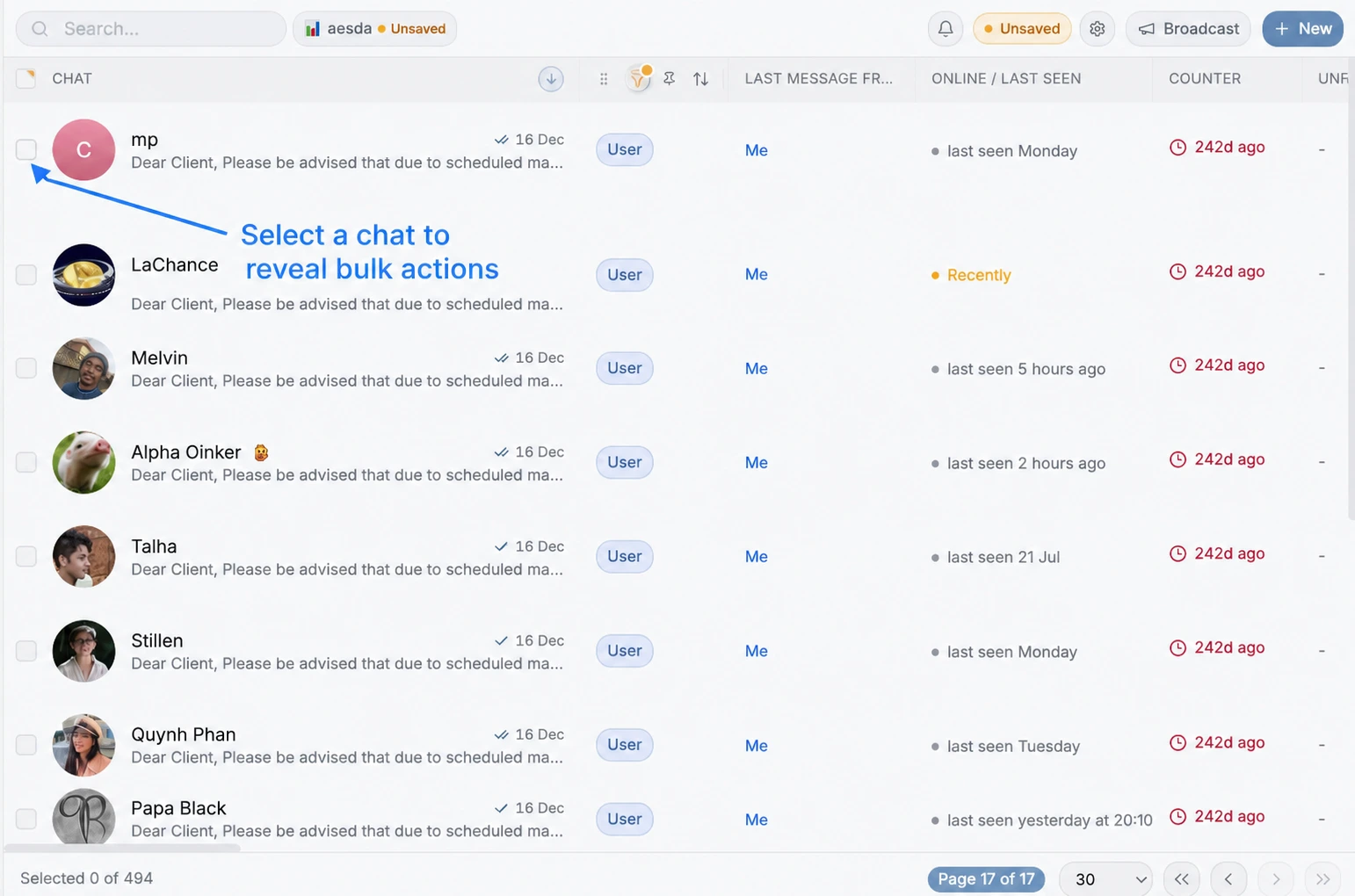
- Tick one or more chat checkboxes, or use the header checkbox for the current page.
- In the selection toolbar choose Add fields.
- Choose the Multi-select label column and the label to apply.
- Check the selected count, confirm the change and review a sample row.
- Use Remove fields to clear a label from the same audience.
WORK QUEUES
Build views for roles, not features
A view is a saved operating question: what is in scope, which columns matter, how work is sorted and whether it is displayed as a table or board.
Build the morning queue
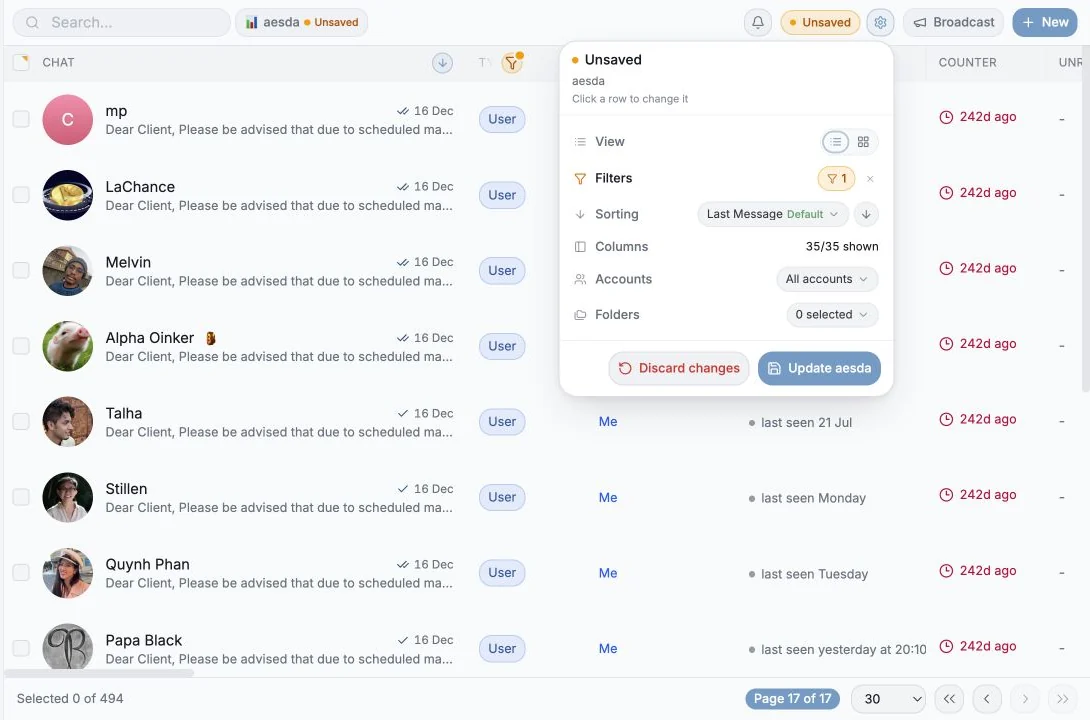
- Choose Accounts and Telegram folders in scope.
- Add filters for the customer segment or waiting state.
- Show only the columns needed to decide the next action.
- Sort the longest-waiting conversations first.
- Save the configuration and share it with the workspace when it is a team workflow.
Create the first Kanban board
- Switch the saved view from Table to Board.
- Group by the Stage Select column.
- Drag a chat between lanes to update its Stage value.
- Keep a No value lane visible until field coverage is complete.
- Save the board state back to the shared view.
| Use table when… | Use board when… |
|---|---|
| You need scanning, sorting or bulk edits. | You need to move work through visible stages. |
| You are auditing field coverage. | The team runs a standup around ownership or stage. |
BULK OPERATIONS
Use Telegram folders and bulk actions safely
Folders organize the Telegram account itself. Custom fields organize the shared CRM. Bulk actions let operators update both without opening every chat.
Choose the right organizing tool
| Need | Use |
|---|---|
| The organization should also appear in the Telegram app | Telegram folder |
| The team must share, filter and report on the value | Custom field |
| A temporary audience for one send | Saved view or selected rows |
| A unit of work with an owner and status | Ticket |
Bulk-action runbook
- Filter first so the audience is explainable.
- Select rows and verify Selected n of total.
- Choose one action: Mark read, Pin, Folder, Add/Remove fields, Broadcast or Exclude.
- Read the confirmation carefully; folder changes modify Telegram itself.
- Audit the result in the table or Analytics → Log history.
OUTBOUND
Send a safe, personalized broadcast
A broadcast is an accountable background job, not a copy-paste blast. Build the audience deliberately, preview resolved variables and start with a small batch.
Build the audience
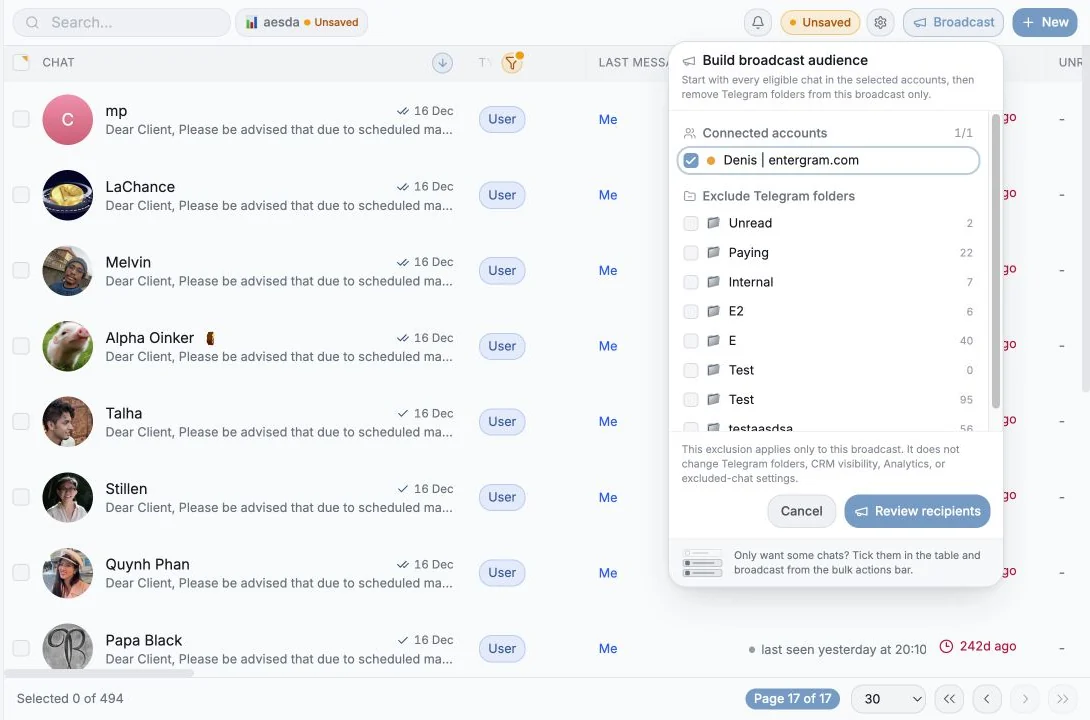
- Filter the Messages view or select the exact chats.
- Click Broadcast in the toolbar.
- Choose the sending account.
- Exclude internal, paying, muted or other protected Telegram folders as needed.
- Review the recipient count before composing.
Compose, preview and queue
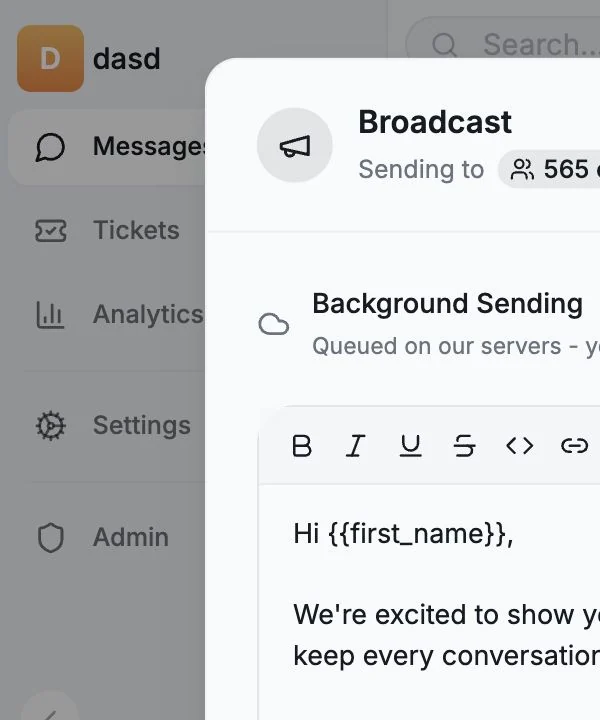
- Prefer {{first_name}} to {{username}} because usernames may be missing.
- Write the sentence so an empty variable cannot break it.
- Preview at least two real recipients and check attachments.
- Start with roughly twenty recipients, then expand after checking delivery.
- The job runs in the background; use History to pause, resume, cancel and review engagement.
Review timing and queue the send
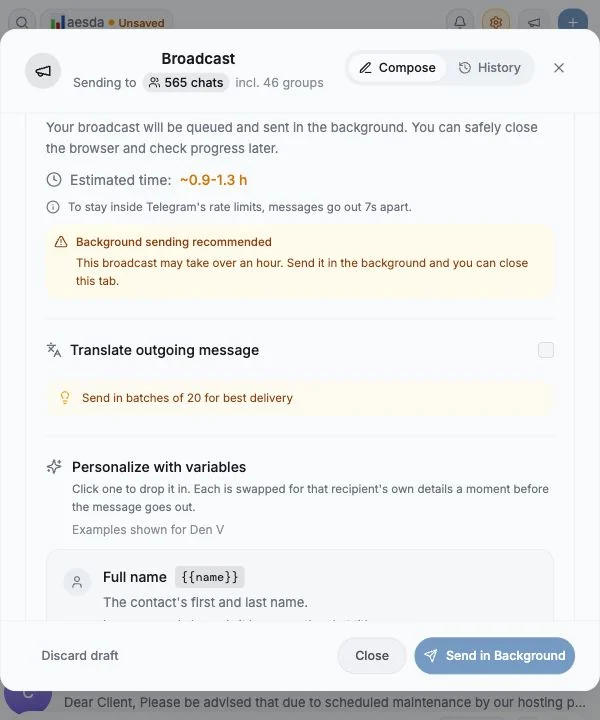
- Confirm the recipient and group counts.
- Read the estimated duration and keep Telegram pacing enabled.
- Recheck variable warnings and the final preview.
- Choose Send in Background only after the audience and message have both been reviewed.
- Open History after launch to watch delivery and stop the job if the audience or content is wrong.
SUPPORT OPERATIONS
Create tickets that survive a handoff
Create a ticket when a conversation becomes assignable work that must survive beyond the chat. Link the chat, and when possible create it from the triggering message so the source message ID is preserved.
Create a ticket from the message that triggered the work
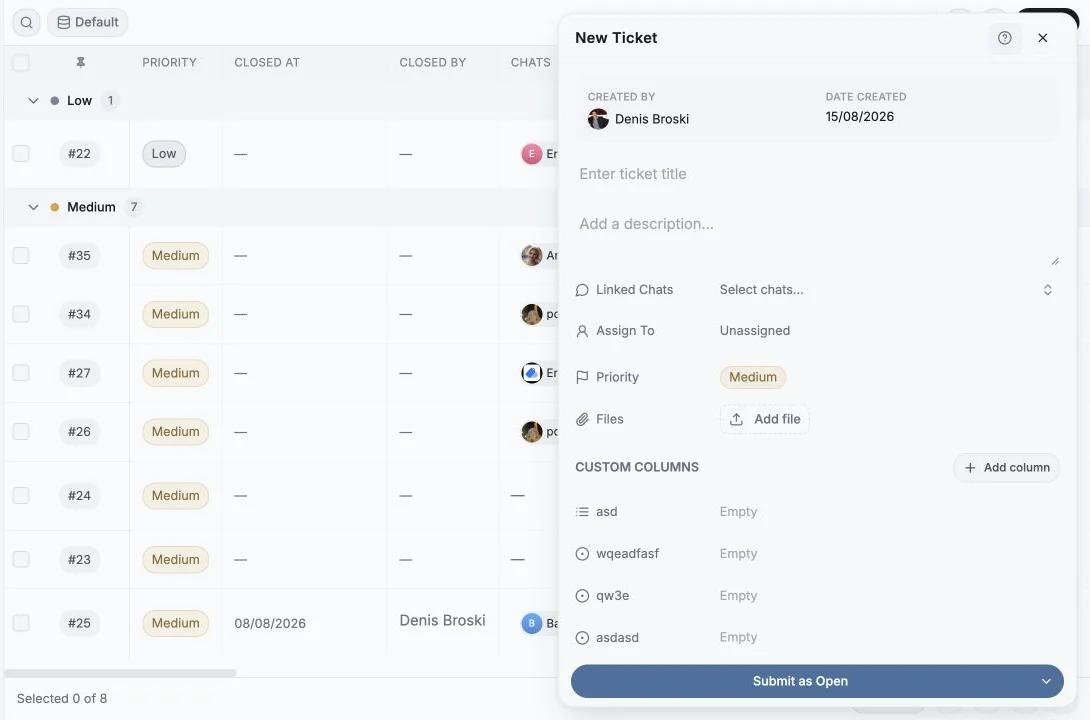
- Open the triggering Telegram message and choose Create ticket from its action menu.
- Write a short outcome-based title and enough description for the assignee to act.
- Verify the Linked Chat and Source Message. The source records the exact incoming or outgoing message and its Telegram message ID.
- Set priority, assignee, due date and any required ticket custom fields.
- Submit into the correct starting status rather than defaulting everything to Open.
Operate the ticket to resolution
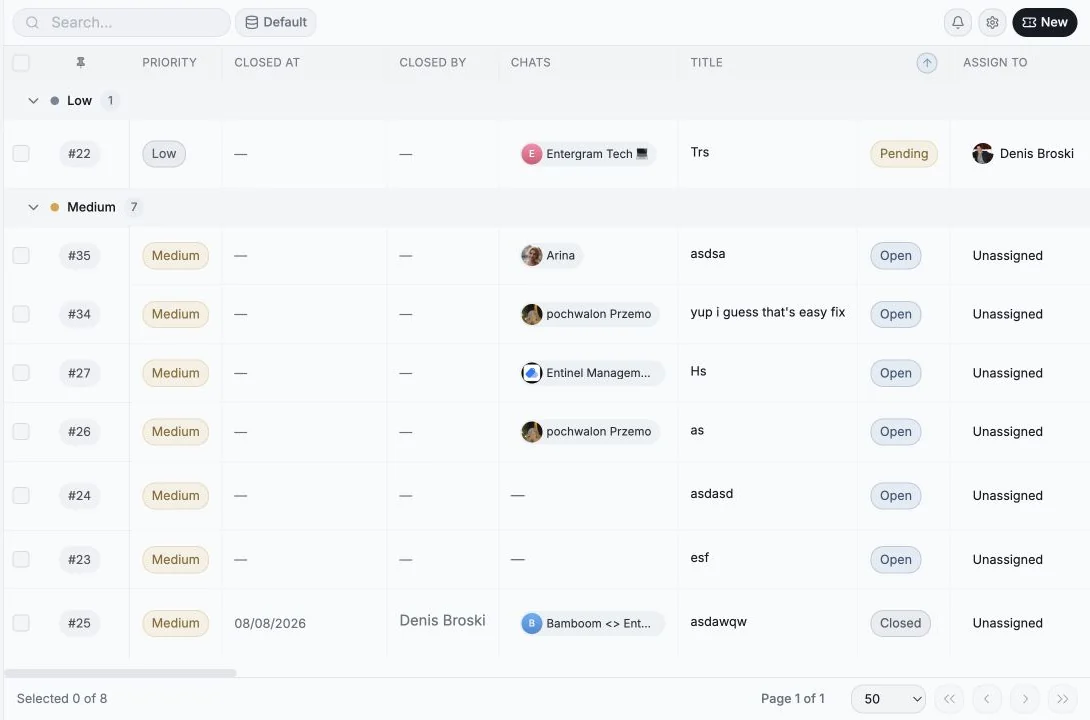
| Moment | Expected action |
|---|---|
| Triage | Confirm source context, priority, assignee and SLA. |
| Work | Use comments for internal decisions; keep customer messages in the linked chat. |
| Handoff | Update status and assignee; record the reason in a comment. |
| Close | Confirm the customer outcome, then close. Closed tickets are read-only until reopened. |
RESPONSE SYSTEM
Templates, reminders and team collaboration
Speed should come from repeatable response patterns and explicit follow-up, not from rushing or relying on memory.
Create five templates before fifty
- Create templates for the five answers the team repeats most.
- Give each one a memorable slash command.
- Keep the template specific enough to help but editable enough to sound human.
- Use internal comments for teammate context; never place internal notes in the customer composer.
Choose the right follow-up mechanism
| Situation | Use |
|---|---|
| You personally need a nudge | Reminder |
| A shared customer commitment must be completed | Ticket |
| A pipeline milestone has a date | Next step custom field |
| A teammate needs context but no action | Internal comment |
MEASUREMENT
Turn reporting into a coaching loop
Analytics is useful when it changes staffing, coaching or process. Begin with response health, then move from overall trends to account, seat, custom-field and ticket detail.
The weekly operating review
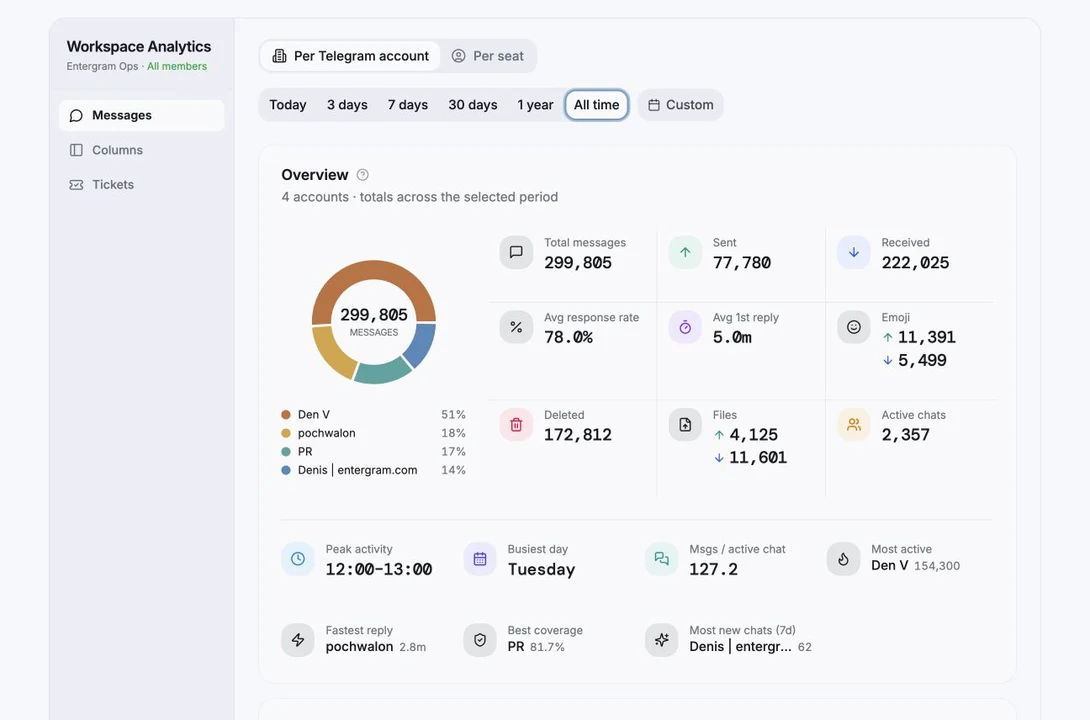
| Question | Where to look |
|---|---|
| Are customers waiting too long? | Response rate and first-response time |
| When should coverage change? | Activity heatmap |
| Which identity carries the workload? | Telegram account breakdown |
| Which teammate needs support? | Seat performance |
| Is the CRM schema being used? | Custom-field coverage |
| Where does support work stall? | Ticket status, SLA and resolution analytics |
Interpret response rate correctly
Find support bottlenecks without misreading the time range
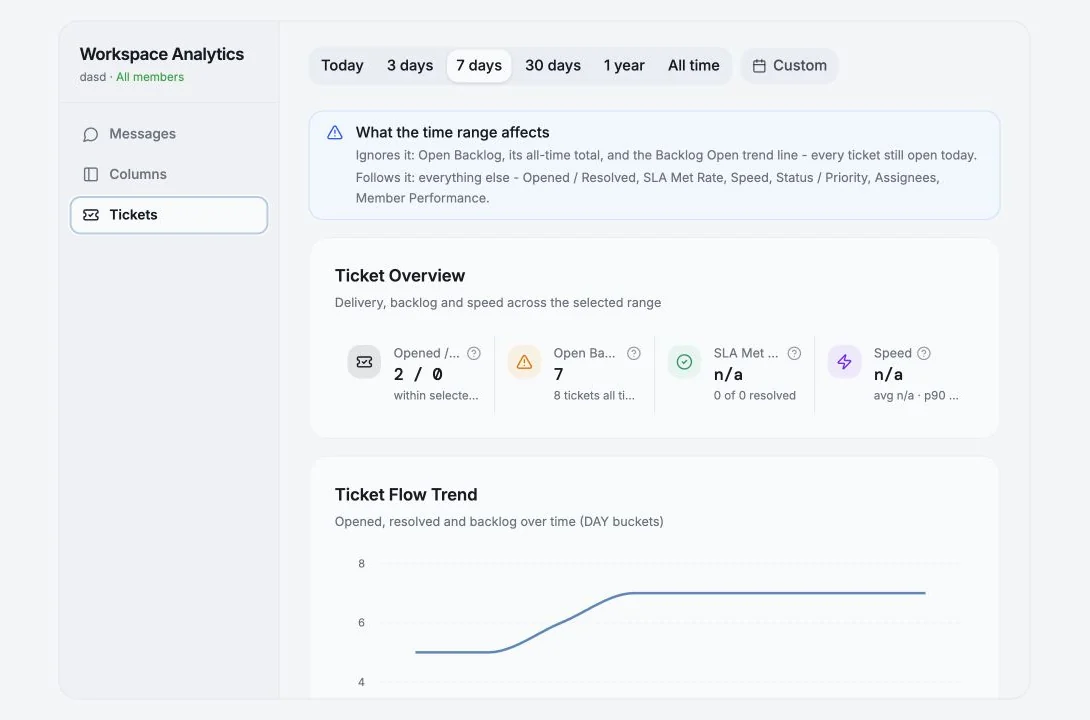
- Read Open Backlog as the work still open today, not only tickets created in the selected dates.
- Use the flow trend to see whether resolved work is keeping pace with new tickets.
- Break down by status, priority and assignee only after confirming the same date scope.
- Leave the review with one named owner and one process change rather than a list of unexplained metrics.
CONTROLLED AUTOMATION
Use MCP for repeatable operations
MCP lets an authorized AI client work with the same accounts, chats and fields available to that connection. Start read-only, make the audience explainable and require review for writes.
The automation maturity ladder
| Level | Example | Control |
|---|---|---|
| Ask | Which qualified leads have no next step? | Read-only |
| Review | Draft a bulk label change for these chats. | Human approves audience and values |
| Routine | Every Friday prepare a coaching digest. | Scheduled, no writes |
| Approved workflow | Update unambiguous CRM matches. | Narrow scopes, logs and exception queue |
Useful starter instructions
- List chats with no owner and no next step; do not modify anything.
- Propose which chats should receive the VIP label and explain the evidence.
- Draft tickets for unresolved product failures, preserving the linked chat and source message.
- Prepare a broadcast audience from the Paying segment, excluding Internal and Do not contact; do not send.
- Summarize response risks by seat and cite the conversations used as evidence.
OPERATING RHYTHM
Roll out in 30 days, then run a fixed cadence
Adoption becomes durable when the team can see a measurable improvement and every recurring review has an owner.
Thirty-day rollout
| Period | Focus | Evidence of progress |
|---|---|---|
| Days 1–7 | Accounts, permissions, exclusions and first saved view | Every active conversation has an owner and next action |
| Days 8–14 | Templates, reminders, tickets and response baseline | Waiting work is visible and assigned |
| Days 15–21 | Broadcast pilot and read-only MCP routine | Small reviewed campaign and useful weekly digest |
| Days 22–30 | Shared boards, analytics review and one approved integration | Handoffs are structured and reviewable |
Recurring operator checklist
- Daily: clear the morning queue and oldest waiting conversations.
- Weekly: review response health, unowned chats, stale tickets and field coverage.
- Before each broadcast: audit audience, variables, exclusions and batch size.
- Monthly: remove unused fields and views, review permissions and reconnect unhealthy accounts.
- Quarterly: review automation scopes, account access and whether the operating model still matches the team.