将 Entergram 连接到 Perplexity
把 Entergram 作为自定义 MCP 连接器连接到 Perplexity,让你可以在 thread 或 Space 中调取并操作你的 Telegram CRM。
MCP 服务器 URL:
https://mcp.entergram.com/mcp- 拥有 owner 或 admin 权限的 Entergram 工作区。
- 一个 Perplexity Pro、Max 或 Enterprise 套餐。自定义连接器在免费套餐上不可用。 在 Enterprise 上,必须先由管理员开启 Allow members to add custom connectors。
- 无需下载。 你可以在 perplexity.ai 的 Perplexity 网页应用中,于 Settings → Connectors 下添加连接器。远程 MCP 服务器 URL 必须使用 HTTPS,Entergram 符合条件。
在 Enterprise 上,由管理员设置一次连接器并在组织范围内共享;成员随后在自己的设置中授权它,参见下方的 Enterprise 部分。
连接(Pro、Max)
Section titled “连接(Pro、Max)”第 1 步。 在 Entergram 中,前往 Settings → Workspace → Connectors → MCP,复制你的 MCP 服务器 URL(https://mcp.entergram.com/mcp)。
第 2 步。 在 Perplexity 中,前往 Settings → Connectors,点击 + Custom connector。选择 Remote。
第 3 步。 填写表单:
- Name:
Entergram - MCP server URL:
https://mcp.entergram.com/mcp - Authentication: OAuth(无需 Client ID 或 Secret,Perplexity 会自动发现 Entergram 的登录方式)
勾选 “I understand custom connectors can introduce risks”,然后点击 Add。
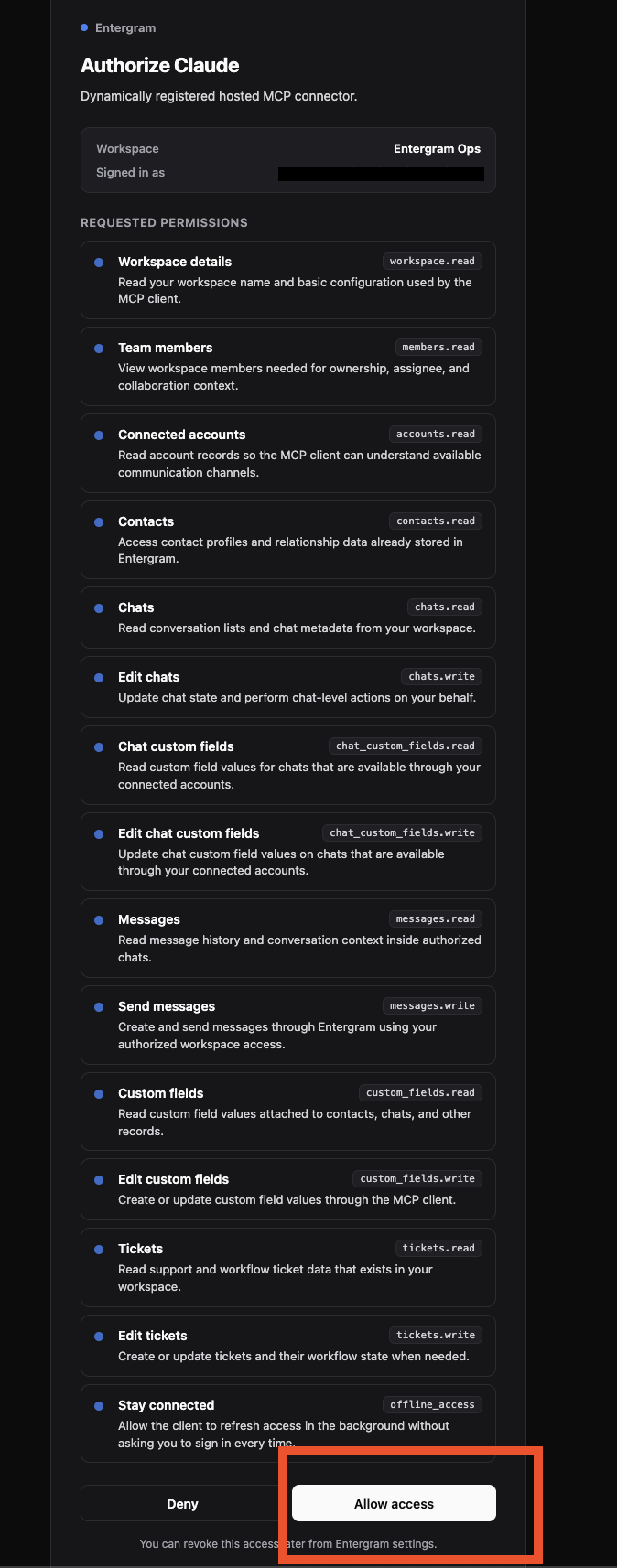
第 4 步。 点击 Entergram 连接器卡片。系统会提示你用 Entergram 账号登录(就像「Sign in with Google」那样的提示),登录、查看权限,然后点击 Allow access。
第 5 步。 要使用它,点击搜索框里的 +,确保 Entergram 已在 Connectors / Sources 下被选中。然后试试:「列出我的 Entergram 工作区。」
小提示: 在任意 Space 中添加一条简短的自定义指令,告诉 Perplexity 何时使用 Entergram(例如 “Use the Entergram connector for anything about my Telegram chats or tickets”)。这能让它自动选用正确的工具。
Enterprise
Section titled “Enterprise”管理员设置(一次性)。 前往 Enterprise settings → Connectors,开启 Allow members to add custom connectors,然后点击 + Custom connector。填写相同的 Name 和 URL,勾选风险确认框,点击 Add,然后为整个组织开启该连接器。
每位成员。 打开 Settings → Connectors,在 Custom 下找到 Entergram,点击它,用 Entergram 账号登录,然后点击 Allow access。
- 没有「+ Custom connector」按钮 - 你使用的是免费套餐,或(在 Enterprise 上)你的管理员尚未启用自定义连接器。
- 无法连接 /「invalid URL」 - 请从 Settings → Workspace → Connectors → MCP 重新复制 MCP 服务器 URL,并确保末尾没有多余空格。
- 连接器连上了但 Perplexity 从不使用它 - 在你的 Space 中添加一条自定义指令(参见上方的小提示),并确认 Entergram 已在 Connectors / Sources 下被勾选。
- 工具调用返回 403 错误 - 你的 Entergram 账号需要拥有该工作区的 owner 或 admin 权限,且你的套餐必须包含 MCP 访问权限。
需要了解全貌?请查看 MCP 连接器概述。
Cookie preferences
We respect your right to privacy. Choose which cookies to allow, your choice applies across our site. Cookie Policy
Required for the site to work, including remembering your privacy choices. Always on.
Help us understand site use and attribute sign-ups to referral partners. Optional.