衡量自定义字段的使用率与覆盖率
Analytics → Custom fields(分析 → 自定义字段)只回答一个问题:我们设计的这套结构,真的有人在填吗?
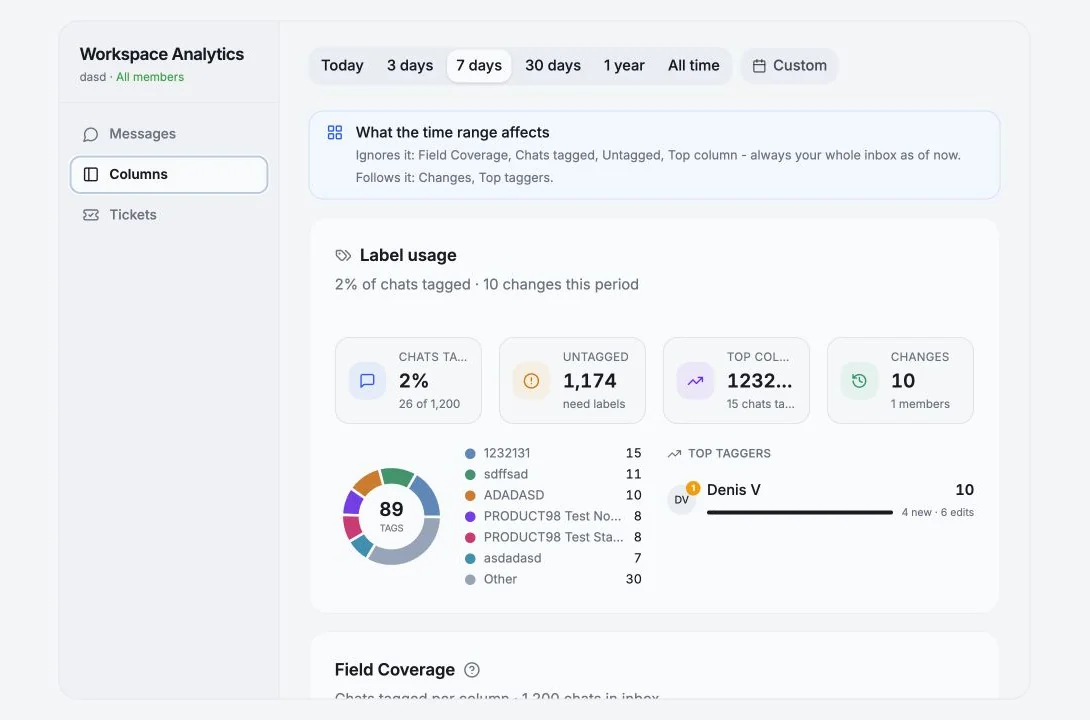
哪些指标跟随时间范围,哪些不跟随
Section titled “哪些指标跟随时间范围,哪些不跟随”这个页面会在最上方直接说明,因为这一点很重要:
忽略时间范围: Field Coverage(字段覆盖率)、Chats tagged(已标记聊天)、Untagged(未标记)、Top column(使用最多的字段),始终基于你当前的全部收件箱。 跟随时间范围: Changes(变更)、Top taggers(标记最多的成员)。
所以某一周显示“0 次变更”并不代表覆盖率下降了,只代表这段时间没有人做标记。
| 统计项 | 含义 |
|---|---|
| Total Fields | 当前视图中的自定义列数量 |
| Average Coverage | 所有字段中已设置值的聊天占比的平均数 |
| High Coverage | 在至少 75% 的聊天中被填写的字段 |
| Needs Attention | 在不到 25% 的聊天中被填写的字段 |
| Members | 贡献过字段变更的工作区成员 |
Needs Attention 是最该采取行动的一项。低于 25% 的字段要么没有必要,要么无人执行,判断属于哪一种,然后删掉它,或者指定一个人负责它。
Field Coverage(字段覆盖率)
Section titled “Field Coverage(字段覆盖率)”按列显示:被填写的频率,以及值的分布。
- “
{total}个聊天中有{filled}个”,并附带解释计数方式的提示。 - 多选列会有一段更长的提示:因为一个聊天可以有多个值,各个值的计数之间会重叠,加起来会超过被标记聊天的总数。这是正常现象,不是缺陷。
- 每个字段的 Top values(最常用值),可通过 Show
{n}more 展开。
Label usage(标签使用情况)
Section titled “Label usage(标签使用情况)”一个环形图加上若干辅助计数:
- Chats tagged / Untagged,“
{pct}% 的聊天已标记” - Top column,应用到最多聊天的字段
- Changes,本期新增、编辑或清空的自定义字段值
{total}个列中有{used}个承载了数据,让你看到有多少结构其实是累赘- Top taggers,按成员显示:
{created}个新增 ·{edits}次编辑 ·{n}次清空,并附 Last active(最近活跃时间)
Field Update Activity(字段更新活动)
Section titled “Field Update Activity(字段更新活动)”一张展示自定义字段值何时被更新的热力图。颜色越深表示更新越多;点击某个单元格可以查看明细。它很适合判断标记是随着工作自然发生的,还是周五下午带着愧疚感一次性补上的。
Top Chats by Field Completion(字段填写最完整的聊天)
Section titled “Top Chats by Field Completion(字段填写最完整的聊天)”按完成率列出填写字段最多的聊天。跨成员的重复项会被去重。
Recent Changes(最近变更)
Section titled “Recent Changes(最近变更)”最近 n 次字段值更新,形如 “Set to: {value}”、“Removed: {value}”,并显示所属聊天、字段和操作人。
在工作区模式下,这个动态流不止包含字段编辑,还会涵盖 Telegram 与工作区操作:消息发送/编辑/删除、表情回应、转发、媒体、成员加入/退出、角色变更、账号共享/取消共享/重新连接、群发发送、评论、文件、列的创建/删除、提醒、工单事件以及 API 密钥事件。
Member Activity(成员活动)
Section titled “Member Activity(成员活动)”谁在更新自定义字段,按成员显示自定义字段变更、Telegram 操作和工作区操作的次数。
| 提示 | 含义 |
|---|---|
| No Workspace Custom Fields | 还没有任何工作区范围的列,请在 Chats 视图中创建 |
| No Custom Fields | 你还没有创建任何个人自定义字段 |
| Select an account to view custom fields analytics | 请在筛选器中选择一个账号 |
一套实用的例行流程
Section titled “一套实用的例行流程”每月一次:
- 按覆盖率排序字段。低于 25% 的一律删除或指定负责人。
- 查看
{total}个列中有{used}个承载了数据。如果是 11 个里只有 4 个,你的表格大部分是噪音。 - 看 Top taggers。如果 80% 的标记都由一个人完成,那这就不是流程,而是这个人。
- 用 No custom fields 筛选器建立一个 Untagged 视图,然后逐步把它清空。
Cookie preferences
We respect your right to privacy. Choose which cookies to allow, your choice applies across our site. Cookie Policy
Required for the site to work, including remembering your privacy choices. Always on.
Help us understand site use and attribute sign-ups to referral partners. Optional.