Аккаунты
Settings → Accounts, подключение аккаунтов Telegram и управление ими.
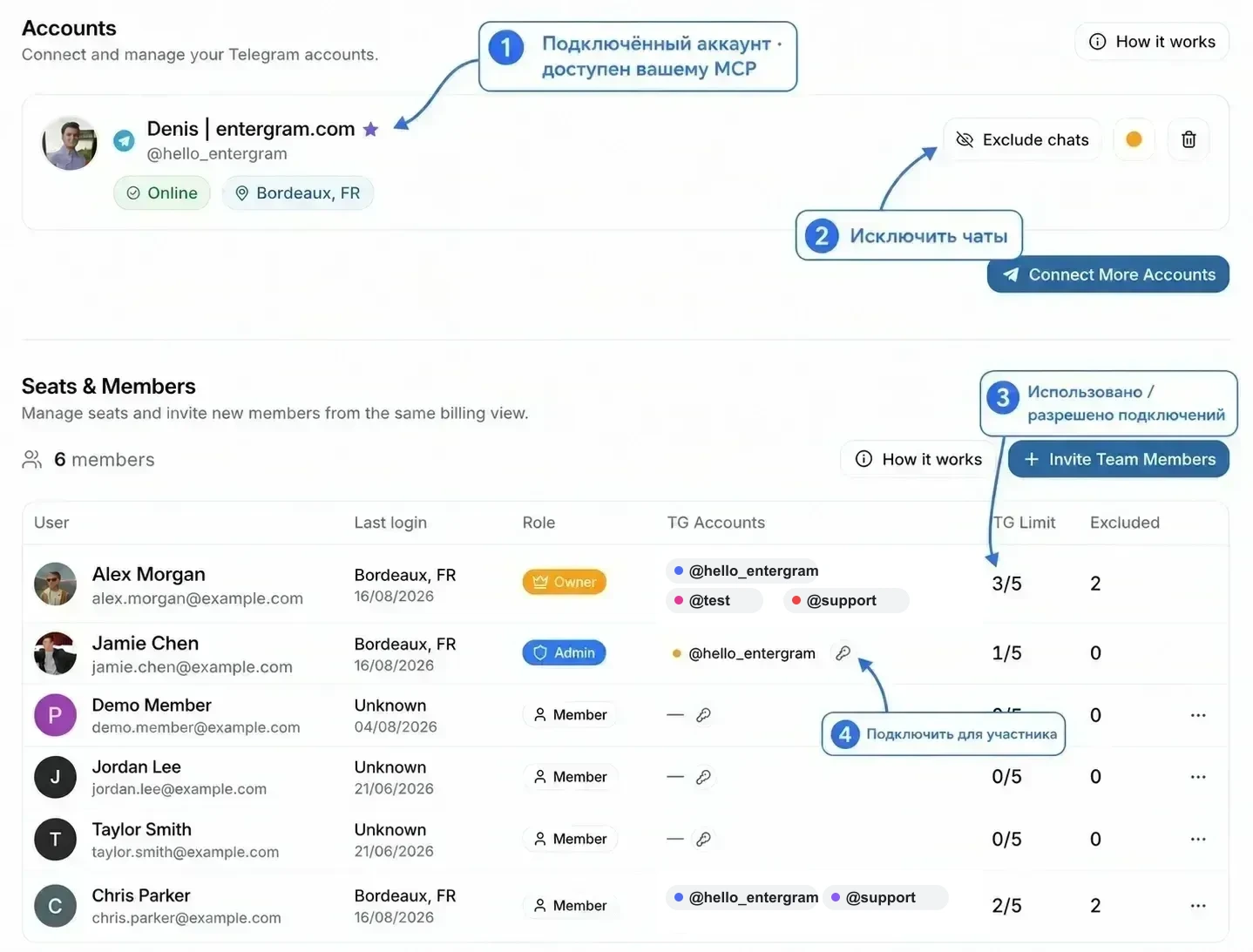
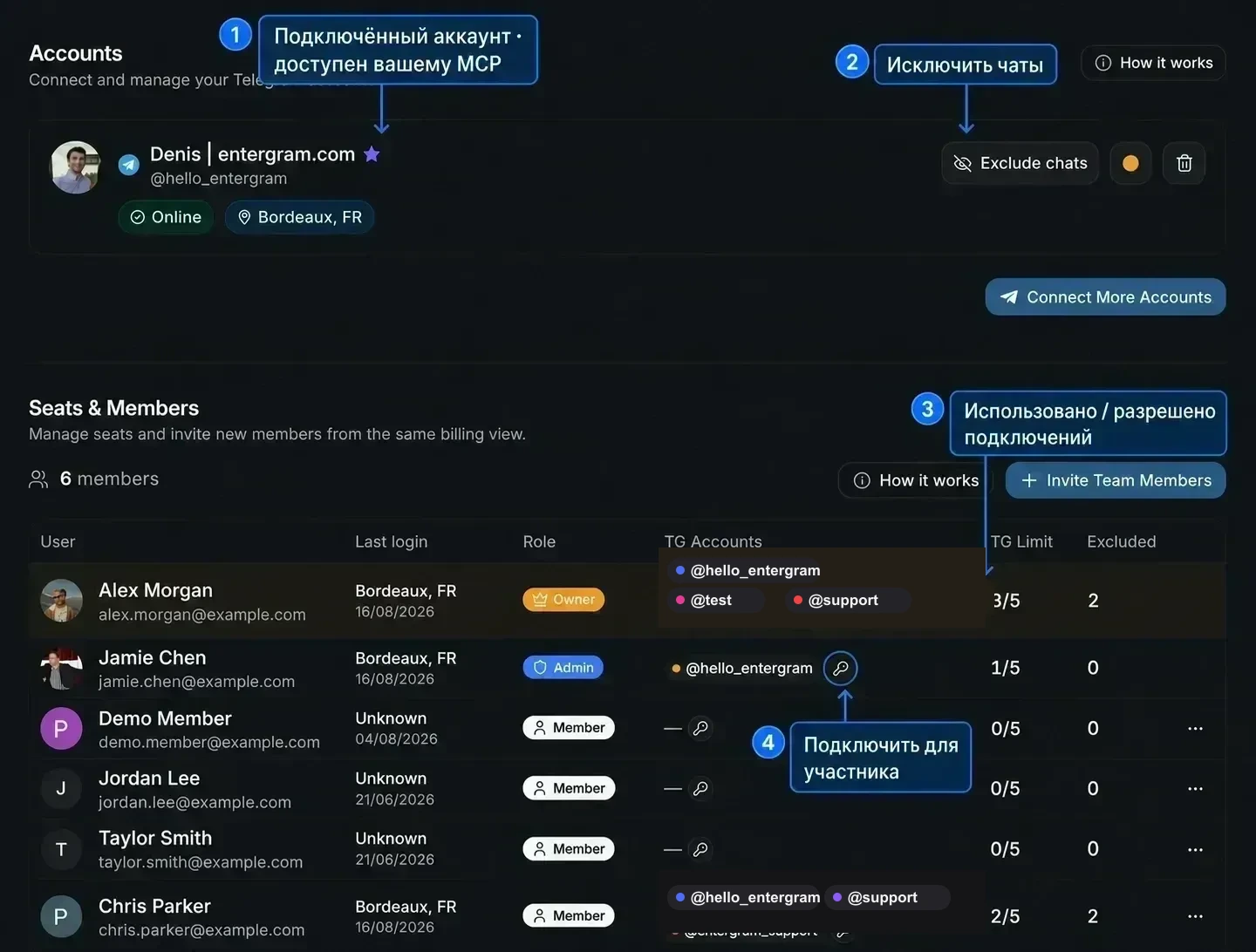
Панель сразу сообщает два главных факта:
Каждый аккаунт Telegram работает через собственный выделенный прокси с уникальным IP-адресом. Entergram использует стандартное промышленное шифрование для защиты Ваших аккаунтов.
Смотрите Прокси и изоляция IP и Как мы защищаем Ваши данные.
Аккаунты, места и область действия MCP
Заголовок раздела «Аккаунты, места и область действия MCP»Элемент в разделе Accounts представляет собой реальное подключение аккаунта Telegram: аутентифицированную сессию Telegram, которую Entergram может синхронизировать, показывать в CRM и использовать для отправки сообщений. Это не то же самое, что место (seat), которое является членством в рабочем пространстве Entergram, закреплённым за человеком.
Для персонального MCP-коннектора практическая граница по Telegram задаётся подключёнными аккаунтами, которые показаны в разделе Accounts этого участника. Обозначения аккаунтов, которые видны в Seats & Members, являются обзором для владельца и администратора: наличие там аккаунта коллеги не даёт Вашему персональному MCP-коннектору автоматический доступ к нему. Коннектору по-прежнему нужны соответствующие права OAuth, например accounts.read, chats.read или messages.write.
Безопасность официального аккаунта:
@hello_entergramявляется единственным официальным именем Entergram в Telegram, показанным здесь.@testи@supportявляются нейтральными заглушками в этом примере, а не контактами поддержки. Проверяйте настоящие ссылки на контакты на сайте Entergram или через точки входа в поддержку внутри приложения.
Смотрите MCP-коннекторы, чтобы разобраться в различии персональных и рабочих коннекторов и в правах доступа.
Слоты аккаунтов

Заголовок раздела «Слоты аккаунтов»«Слоты аккаунтов Telegram, {used} из {count} слотов.»
Слоты являются вместимостью для аккаунтов, которые Вы можете подключить, а не активными подключениями.
В разделе Seats & Members значение TG Limit отображается как использовано / разрешено. Например, 3/5 означает, что это место сейчас использует три подключения Telegram и может подключить ещё два. Это не лимит сообщений, не количество коллег и не ограничение частоты для MCP.
Ваш лимит может определяться:
- Вашим тарифом: пробный период включает 2 слота, платные тарифы 5 на место,
- дополнениями Extra TG на Вашем месте,
- переопределением, заданным администратором («Этот лимит установлен администратором»).
Повторное подключение существующего аккаунта никогда не занимает дополнительный слот.
Нужно больше? Increase Limit / Contact us for a custom plan.
Карточка аккаунта
Заголовок раздела «Карточка аккаунта»| Элемент | Значение |
|---|---|
| Статус | Смотрите таблицу ниже |
| Online / Offline | Присутствие в реальном времени |
| Тариф Telegram | Telegram Premium или Telegram Standard |
исключено {n} | Исключённые чаты на этом аккаунте |
| Цвет | Цвет аккаунта, который используется в значках по всей таблице |
Значки статуса
Заголовок раздела «Значки статуса»| Значок | Значение | Действие |
|---|---|---|
| Live Sync Ready (зелёный) | Подключён и синхронизируется | Ничего не нужно |
| Shared Access (синий) | Этот вход в Telegram используется совместно с другим местом, которое держит живое подключение | Ничего не нужно |
| Needs Migration (янтарный) | Подключён по старому сценарию, нужен один свежий вход | Connect Live Sync |
| Reconnect Required (оранжевый) | Живое подключение потеряно | Reconnect Live Sync |
| Session expired (красный) | Сессия Telegram завершена, прекращена из меню Devices в Telegram или аннулирована сменой пароля | Reconnect Live Sync |
Действия
Заголовок раздела «Действия»| Действие | Что делает |
|---|---|
| Reconnect / Connect Live Sync | Повторная аутентификация аккаунта (нужен тот же аккаунт Telegram) |
| Exclude chats | Открывает менеджер исключённых чатов для этого аккаунта |
| Disconnect | Останавливает синхронизацию этого аккаунта |
Аналитика
Заголовок раздела «Аналитика»Аналитика появляется вместе с подключением аккаунта, отдельной настройки аналитики нет. Если Ваш тариф включает аналитику (Pro, место Pro или пробный период), подключённый аккаунт наполняет представления Аналитики и может отправлять рассылки с серверов Entergram.
На тарифах без аналитики Вы увидите предложения Upgrade to Pro на страницах аналитики.
Совместное использование аккаунта с коллегой
Заголовок раздела «Совместное использование аккаунта с коллегой»Поделитесь аккаунтом Telegram с коллегой, подключив один и тот же вход Telegram в двух разных местах. Каждое место получает собственное подключение Entergram к одному и тому же аккаунту Telegram, и это подключение занимает один слот Telegram в каждом месте. После этого оба коллеги могут работать с общим ящиком, не делясь учётной записью Entergram. Подробности в статье Подключение аккаунта Telegram.
Как работают аккаунты (краткая справка самой панели)
Заголовок раздела «Как работают аккаунты (краткая справка самой панели)»Блок How it works на этой странице объясняет модель в трёх пунктах:
- Каждый аккаунт изолирован: «Он работает через собственный прокси с уникальным IP и зашифрованной сессией. Никакой другой участник не может читать его сообщения.»
- Общий аккаунт на несколько мест: «Подключите тот же вход Telegram в месте коллеги, и дальше вы работаете с одним ящиком вместе.»
- CRM-данные принадлежат чату: «Пользовательские колонки, тикеты и заметки живут на чате, а не на аккаунте. Их видит каждый, кто имеет доступ к чату.»
Если коротко: сообщения остаются у аккаунта, CRM-данные остаются у чата.
Частые сообщения
Заголовок раздела «Частые сообщения»| Сообщение | Что делать |
|---|---|
Session expired for {account}. Please disconnect and reconnect. | Переподключите аккаунт |
| Account disconnected. You may need to reconnect. | Переподключитесь |
You can connect up to {n} Telegram accounts | Слоты закончились, поднимите лимит или освободите один |
| Only the workspace owner can manage excluded chats. | Владелец заблокировал управление исключениями |
Cookie preferences
We respect your right to privacy. Choose which cookies to allow, your choice applies across our site. Cookie Policy
Required for the site to work, including remembering your privacy choices. Always on.
Help us understand site use and attribute sign-ups to referral partners. Optional.