ورود به Entergram
Entergram رمز عبور ندارد. با کدی یکبارمصرف که به ایمیلتان فرستاده میشود وارد میشوید، یا با Google.
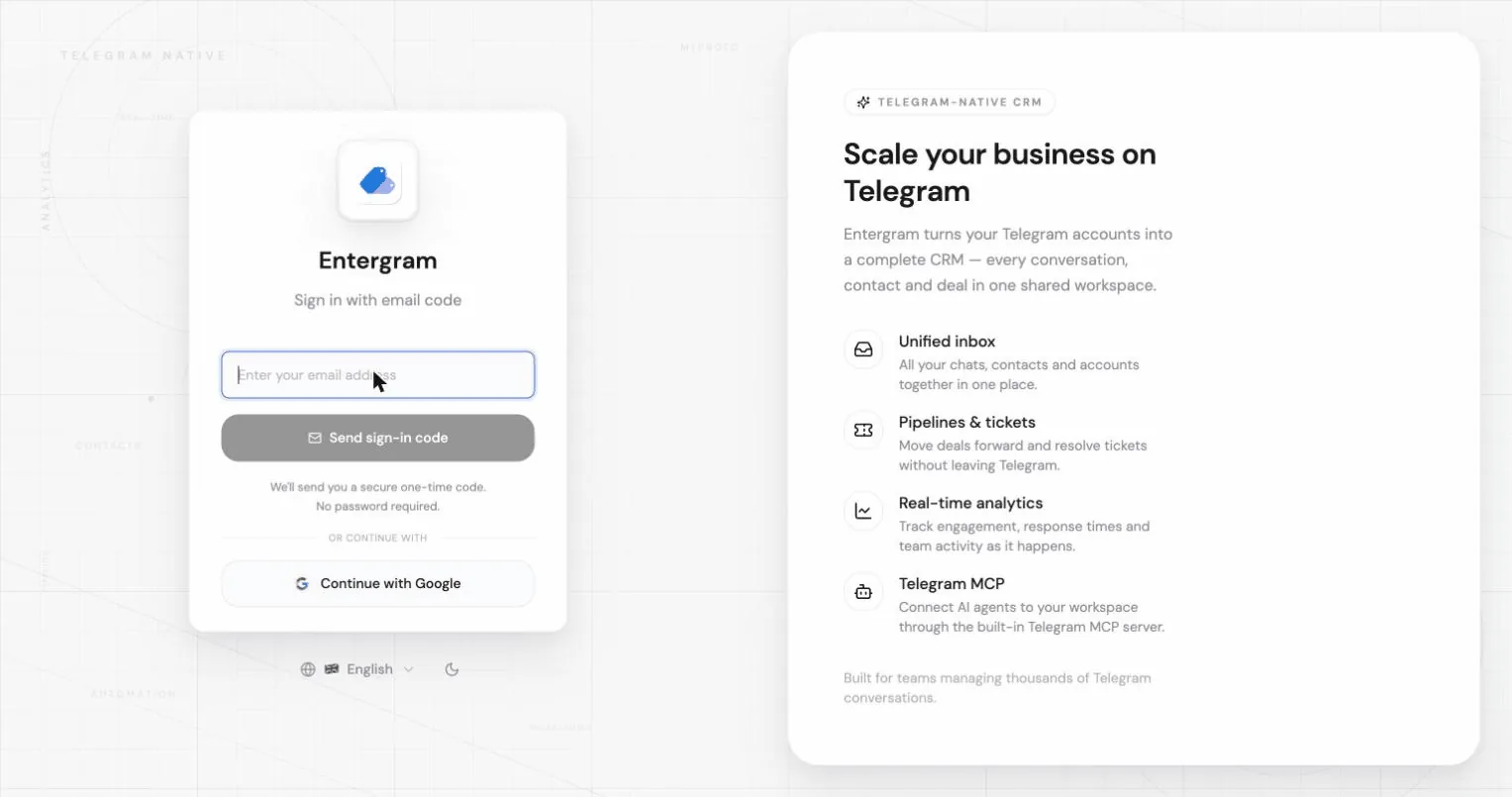
ورود با کد ایمیلی
بخش با عنوان «ورود با کد ایمیلی»- نشانی ایمیل خود را وارد کنید و روی Send sign-in code کلیک کنید.
- صندوق ورودی خود را برای یک کد ۶ رقمی بررسی کنید. این کد برای امنیت خیلی زود منقضی میشود.
- کد را وارد کنید و روی Verify and sign in کلیک کنید.
اگر کد نرسید:
- پوشه هرزنامه را بررسی کنید؛ برنامه هم در صفحه کد این را یادآوری میکند.
- روی Resend code کلیک کنید. بین دو ارسال یک شمارش معکوس کوتاه وجود دارد.
- با Use another email با نشانی دیگری از نو شروع کنید.
اگر پیوند ورود قدیمی را دنبال کنید ممکن است پیام «Sign-in link expired. Please request a new one.» را ببینید؛ کافی است کد تازهای درخواست کنید.
ایمیل ممکن است یک پیوند ورود هم داشته باشد. این پیوند فقط در همان برنامه یا مرورگری کار میکند که کد را از آن درخواست کردهاید: مثلاً اگر گوشی آن را در مرورگر وب باز کند، یا آن را در دستگاه دیگری باز کنید، شما را وارد برنامهٔ موبایل نمیکند. در این حالت Entergram پیام «این پیوند ورود فقط در برنامه یا مرورگری کار میکند که آن را از آن درخواست کردهاید.» را نشان میدهد. بهجای آن کد ۶ رقمی همان ایمیل را وارد کنید؛ کد روی هر دستگاهی کار میکند.
ورود با Google
بخش با عنوان «ورود با Google»در صفحه ورود روی Continue with Google کلیک کنید و درخواست Google را کامل کنید.

هر بار فقط یک مرورگر فعال
بخش با عنوان «هر بار فقط یک مرورگر فعال»اگر جای دیگری وارد شوید، مرورگر قدیمیتر از حساب خارج میشود و این پیام را نشان میدهد:
You were signed out، حساب شما در مرورگر دیگری باز شد. برای ادامه در اینجا دوباره وارد شوید.
این رفتار طبیعی است. در مرورگری که میخواهید با آن ادامه دهید دوباره وارد شوید.
تغییر نشانی ایمیل
بخش با عنوان «تغییر نشانی ایمیل»به Settings → Accounts → Your profile بروید و روی ایمیل خود کلیک کنید.
- نشانی جدید را وارد کنید و روی Send confirmation کلیک کنید.
- Entergram پیوند تأیید را به نشانی جدید میفرستد. بسته به تنظیمات احراز هویت شما ممکن است لازم باشد از نشانی فعلی هم تأیید کنید.
- تا وقتی همه تأییدهای لازم انجام نشده باشد، ایمیل فعلی شما فعال میماند و ایمیل جدید با عنوان Pending email change نمایش داده میشود.
میتوانید یک تغییر در انتظار را با Cancel change رها کنید، در این حالت ایمیل فعلی شما حفظ میشود.
تغییر نام نمایشی
بخش با عنوان «تغییر نام نمایشی»در همان پنل: روی نام خود کلیک کنید، ویرایشش کنید و Save را بزنید. این نام در سراسر فضای کاری و تنظیمات شما دیده میشود و همان چیزی است که همتیمیها کنار دیدگاهها و فعالیت تیکت شما میبینند.
مرتبط
بخش با عنوان «مرتبط»تنظیمات کوکی
ما به حریم خصوصی شما احترام میگذاریم. انتخاب کنید کدام کوکیها مجاز باشند, انتخاب شما در کل سایت اعمال میشود. سیاست کوکی
برای کارکرد سایت لازم است، از جمله بهخاطر سپردن تنظیمات حریم خصوصی شما. همیشه فعال.
به ما کمک میکند استفاده از سایت را درک کنیم و ثبتنامها را به شرکای ارجاع نسبت دهیم. اختیاری.