Iniciar sesión en Entergram
Entergram no usa contraseñas. Usted inicia sesión con un código de un solo uso enviado a su correo, o con Google.
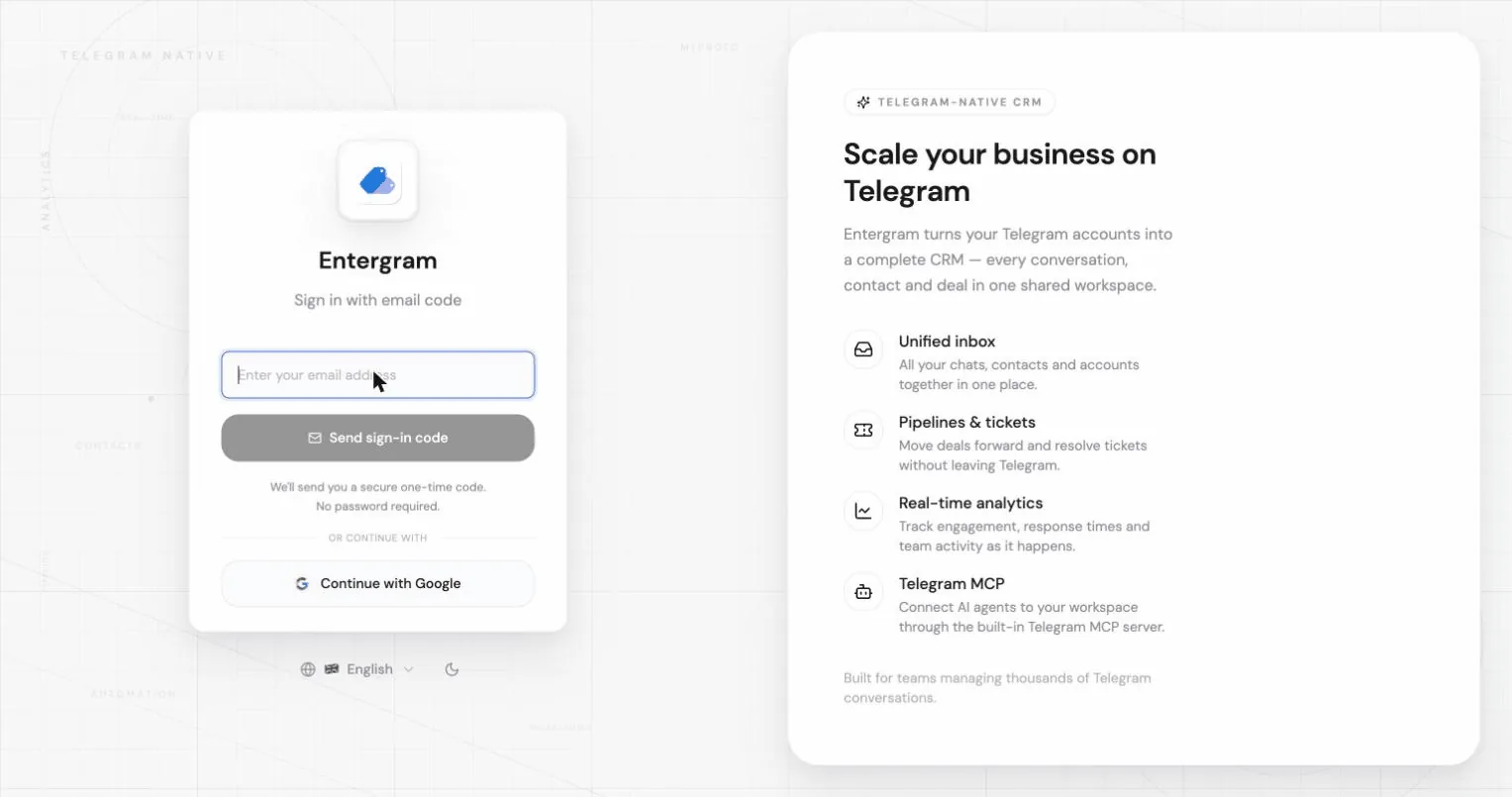
Iniciar sesión con un código por correo
Sección titulada «Iniciar sesión con un código por correo»- Introduzca su dirección de correo y pulse Enviar código de acceso.
- Busque en su bandeja un código de 6 dígitos. Caduca en poco tiempo por seguridad.
- Introduzca el código y pulse Verificar e iniciar sesión.
Si el código no llega:
- Revise la carpeta de spam; la aplicación se lo recuerda en la pantalla del código.
- Pulse Reenviar código. Hay una breve cuenta atrás entre reenvíos.
- Use Usar otro correo para empezar de nuevo con otra dirección.
Si sigue un enlace de acceso antiguo puede ver “El enlace de acceso ha caducado. Solicite uno nuevo.”; basta con pedir un código nuevo.
El correo también puede incluir un enlace de inicio de sesión. Ese enlace solo funciona en la misma app o el mismo navegador donde pidió el código: por ejemplo, no le iniciará sesión en la app móvil si su teléfono lo abre en un navegador web, ni si lo abre en otro dispositivo. En ese caso Entergram muestra “Este enlace de inicio de sesión solo funciona en la app o el navegador donde lo solicitaste.” Introduzca en su lugar el código de 6 dígitos del mismo correo; el código funciona en cualquier dispositivo.
Iniciar sesión con Google
Sección titulada «Iniciar sesión con Google»Pulse Continuar con Google en la pantalla de acceso y complete el diálogo de Google.

Un único navegador activo a la vez
Sección titulada «Un único navegador activo a la vez»Si inicia sesión en otro sitio, el navegador anterior se cierra y muestra:
Se cerró tu sesión. Su cuenta se abrió en otro navegador. Vuelva a iniciar sesión para continuar aquí.
Es el comportamiento esperado. Vuelva a iniciar sesión en el navegador que quiera seguir usando.
Cambiar su dirección de correo
Sección titulada «Cambiar su dirección de correo»Vaya a Configuración → Cuentas → Tu perfil y pulse sobre su correo.
- Introduzca la nueva dirección y pulse Enviar confirmación.
- Entergram envía un enlace de confirmación a la nueva dirección. Según sus ajustes de autenticación, puede que también tenga que confirmar desde su dirección actual.
- Hasta que se completen todas las confirmaciones necesarias, su correo actual sigue activo y el nuevo aparece como Cambio de correo pendiente.
Puede abandonar un cambio pendiente con Cancelar cambio; se conserva su correo actual.
Cambiar su nombre visible
Sección titulada «Cambiar su nombre visible»En el mismo panel: pulse su nombre, edítelo y pulse Guardar. Este nombre aparece en todo su espacio de trabajo y en los ajustes, y es el que ven sus compañeros junto a sus comentarios y su actividad en los tickets.
Relacionado
Sección titulada «Relacionado»Preferencias de cookies
Respetamos tu privacidad. Elige qué cookies permitir; tu elección se aplica en todo el sitio. Política de cookies
Imprescindibles para que el sitio funcione, incluido recordar tus preferencias de privacidad. Siempre activas.
Nos ayudan a entender el uso del sitio y atribuir registros a socios de referidos. Opcional.