Asientos, miembros y roles
Un asiento es un compañero de equipo. Dé un asiento a cada persona y luego conecte Telegram de la forma que mejor se adapte a su equipo.
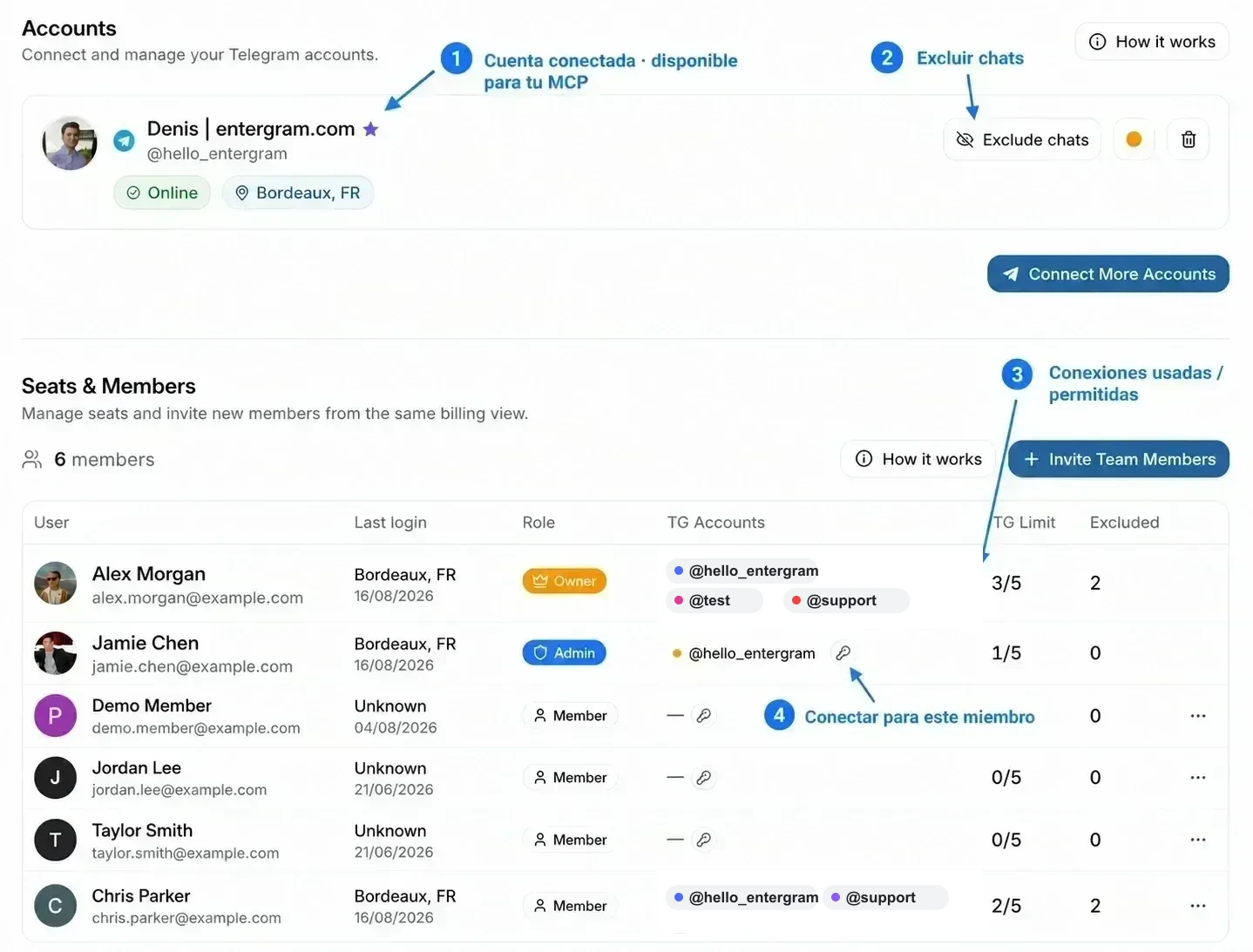
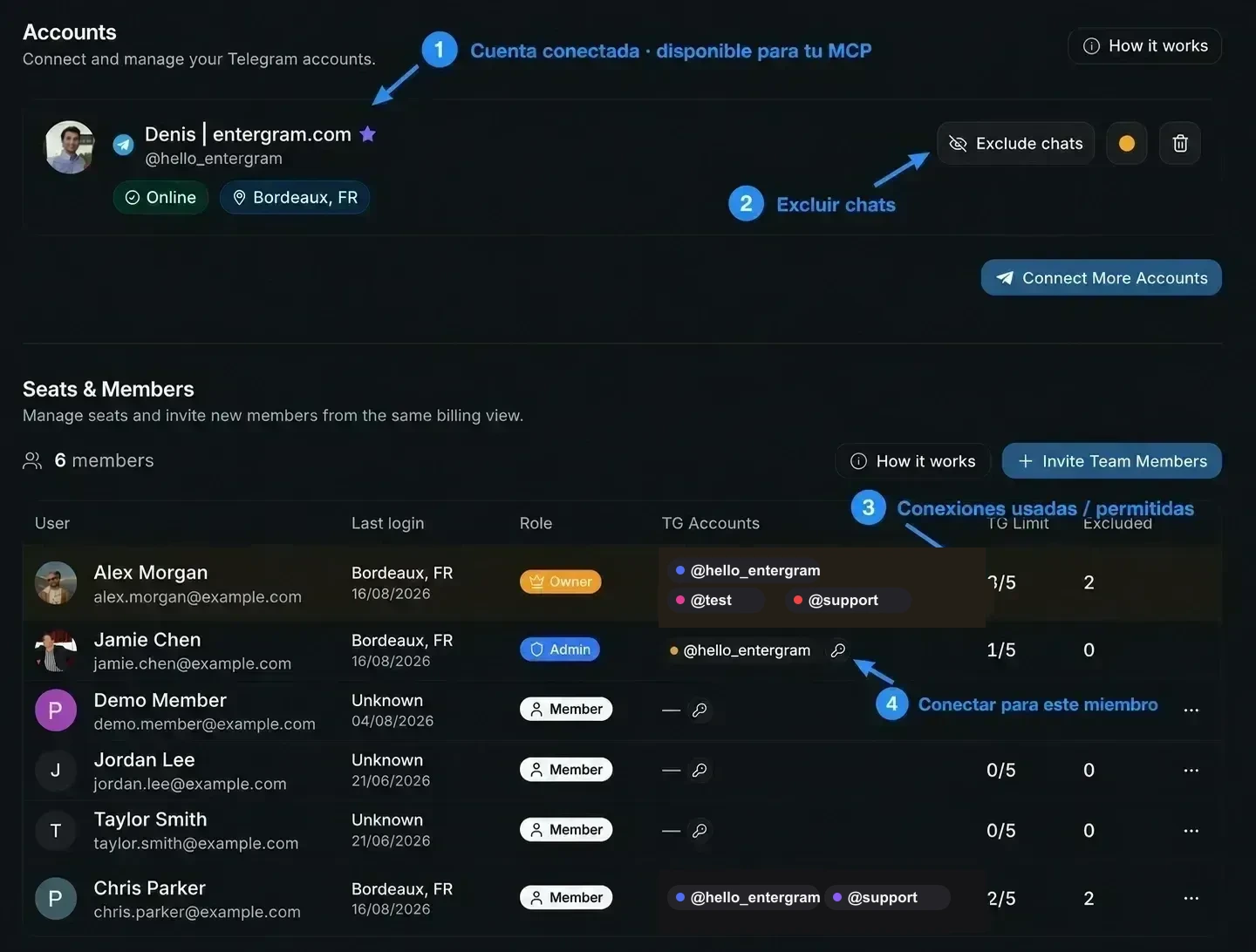
No confunda un asiento con una conexión de cuenta de Telegram:
| Asiento | Conexión de cuenta de Telegram | |
|---|---|---|
| Qué representa | Un miembro del workspace de Entergram | Un inicio de sesión o sesión de Telegram conectado a Entergram |
| Qué controla | Rol, plan, permisos y capacidad de Telegram | Con qué bandejas de entrada, chats y mensajes de Telegram puede trabajar ese miembro |
| Dónde se gestiona | Seats & Members | Cuentas |
| Significado para MCP | La tabla de asientos no es un selector de cuentas para MCP | Un conector MCP personal puede usar las cuentas conectadas que aparecen en la sección Cuentas de ese miembro, según los permisos (scopes) concedidos y las exclusiones |
Qué incluye un asiento
Sección titulada «Qué incluye un asiento»- 5 conexiones de Telegram por asiento, cada una con su propio proxy.
- ¿Necesita más? Añada complementos Extra TG, por asiento o de forma masiva.
- Los planes de asiento tienen dos niveles: Básico y Pro. Los asientos Pro incluyen analítica para ese miembro.
El propietario del workspace es siempre el asiento 1 y está incluido en el plan personal; el acceso del propietario no consume un asiento comprado.
Dos formas de trabajar
Sección titulada «Dos formas de trabajar»| Modelo | Ideal para | Cómo |
|---|---|---|
| Cada uno con su propia cuenta | Ventas y prospección | Cada compañero conecta su propio Telegram y trabaja su propia bandeja de entrada |
| Una cuenta compartida | Soporte | Todos conectan el mismo Telegram y responden desde una bandeja de entrada compartida |
Puede combinar ambos modelos en un mismo workspace, persona por persona.
Para compartir una cuenta, conecte el mismo inicio de sesión de Telegram en dos asientos distintos. Telegram permite que una misma cuenta tenga más de una sesión activa, así que ambos asientos pueden trabajar desde esa cuenta. No se copia ni se reenvía nada, y cada conexión ocupa un hueco del asiento en el que aparece.
Invitar a un compañero
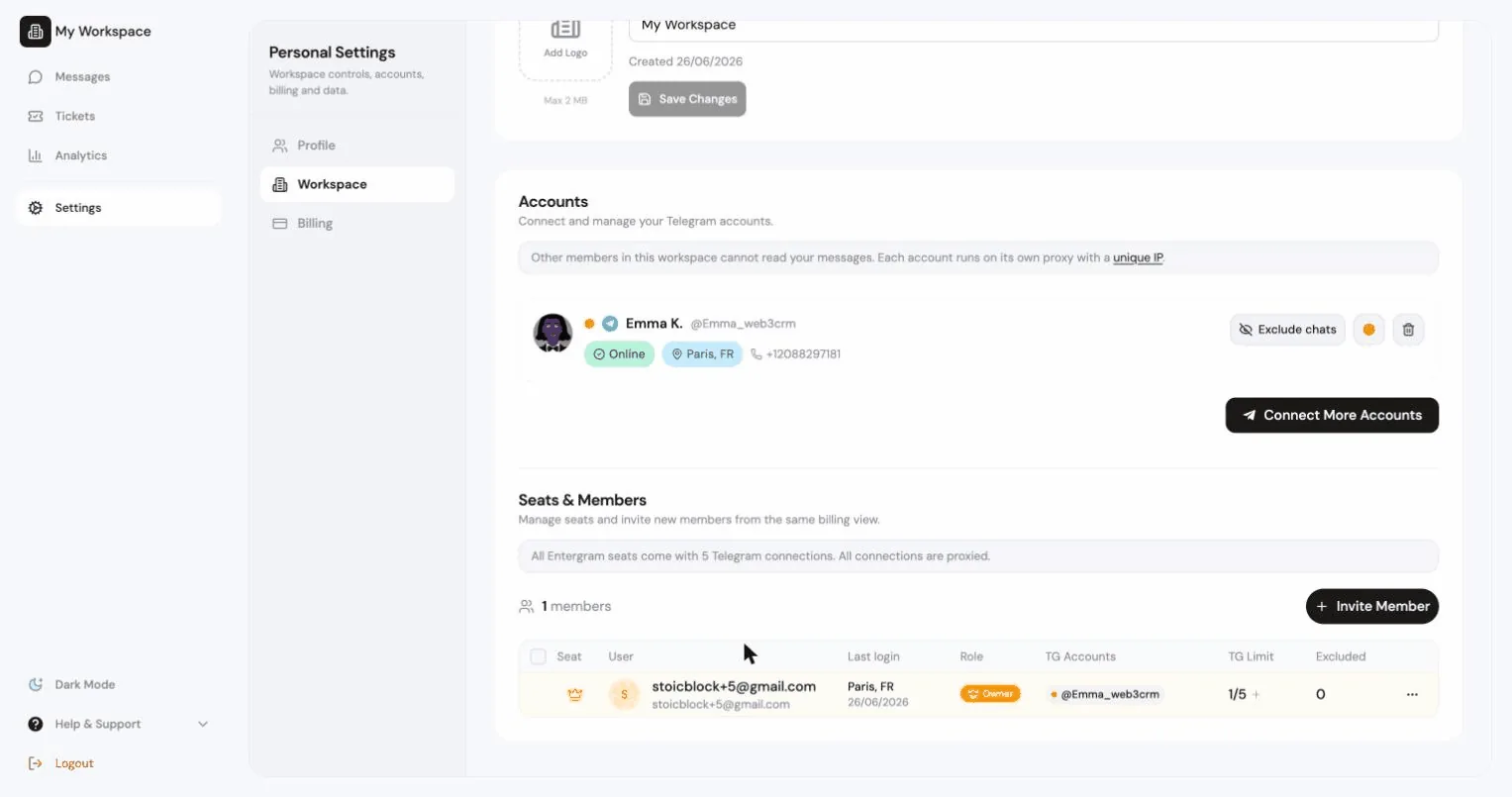
Sección titulada «Invitar a un compañero»Settings → Cuentas → Asientos y miembros del equipo → Invitar.
- Asegúrese de que haya un asiento libre. Si no lo hay, verá “No paid seats available. Purchase more seats to invite members.”
- Opcionalmente, use Asignar a asiento para elegir qué asiento de pago consume este enlace. Déjelo vacío para usar un hueco de invitación de prueba, si está disponible.
- Pulse Generar enlace de invitación y compártalo.
Cualquiera que tenga este enlace puede unirse a su workspace. Los enlaces caducan en 24 horas.
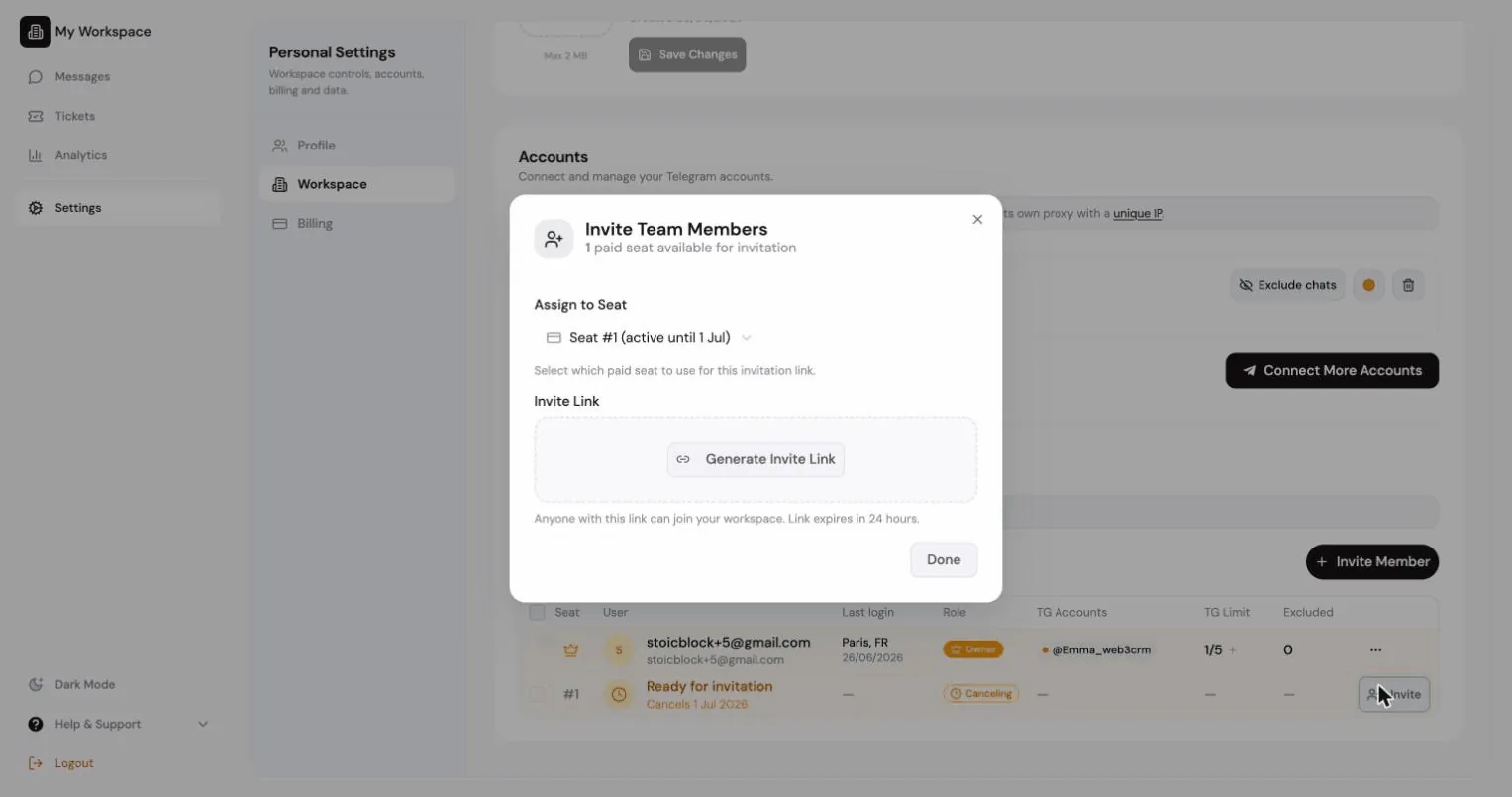
Tanto el propietario como los administradores pueden invitar. Cada asiento libre aparece en la tabla de asientos como una fila Ready for invitation; haz clic en ella para abrir el diálogo de invitación con ese asiento ya seleccionado. Los administradores ven los asientos libres y las invitaciones pendientes, mientras que las filas de facturación (renovaciones, pagos vencidos y compra de asientos) quedan en manos del propietario.
Las invitaciones pendientes aparecen con el tiempo restante, Copiar enlace de invitación y Revoke invitation. Al revocarla, el enlace deja de funcionar al instante.
| Rol | Puede |
|---|---|
| Propietario | Todo, incluidos la facturación, la eliminación del workspace y la transferencia de la propiedad |
| Admin | Gestionar miembros, ajustes del workspace, exportaciones y conectores compartidos |
| Miembro | Trabajar en el CRM, según los interruptores de privacidad del workspace |
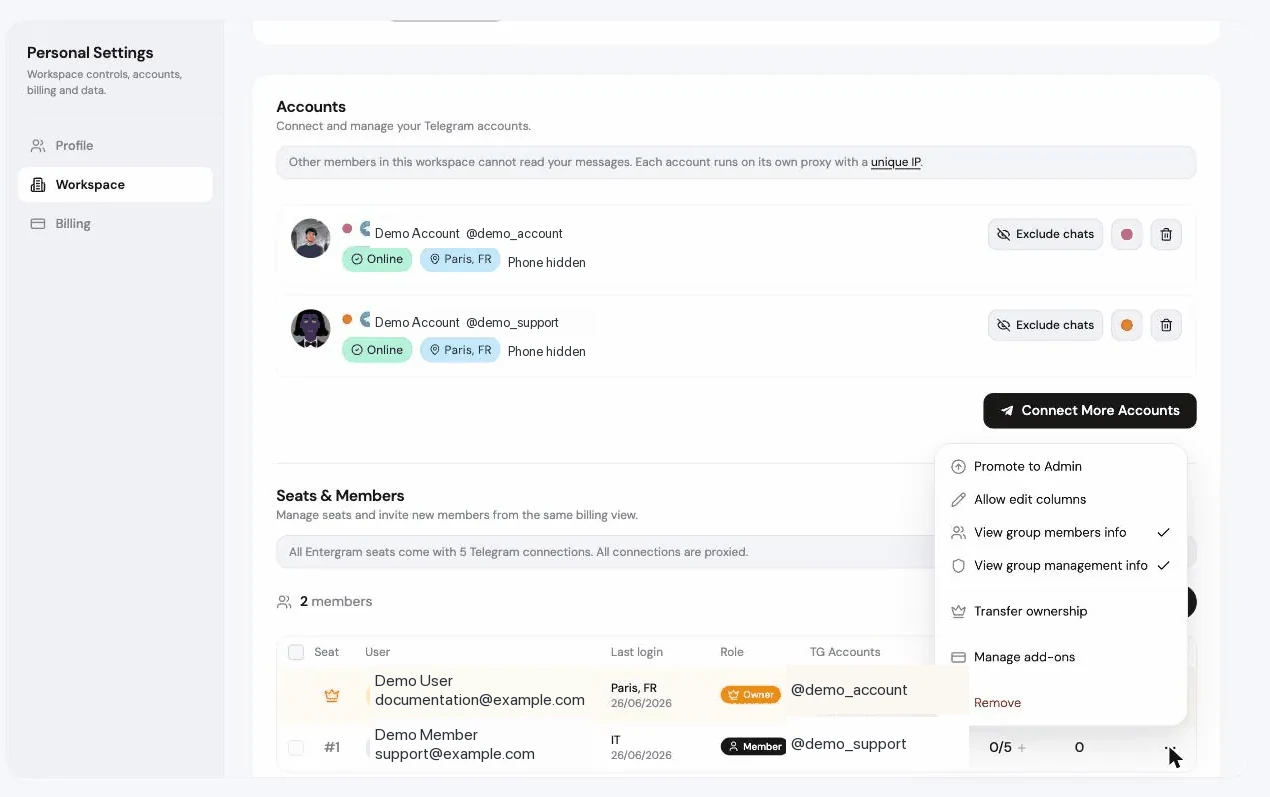
Acciones de rol desde el menú de un miembro: Ascender a Admin, Degradar a Miembro, Transferir propiedad (usted pasa a ser Admin), Remove (su cuenta queda congelada) y Revocar para una invitación pendiente. Cada una pide confirmación.
Permisos por miembro
Sección titulada «Permisos por miembro»Además de los roles, el propietario puede conceder a miembros concretos:
| Permiso | Efecto |
|---|---|
| Permitir editar columnas | Permite a este miembro editar y eliminar columnas personalizadas |
| Ver información de miembros del grupo | Le permite ver las listas de miembros de los grupos |
| Ver información de gestión del grupo | Le permite ver el panel de gestión de grupos |
Los miembros sin estos permisos ven mensajes explicativos en lugar de pantallas vacías, por ejemplo “Group members info is hidden for this seat.”
La tabla de asientos
Sección titulada «La tabla de asientos»Settings → Cuentas → Asientos y miembros del equipo muestra todos los asientos:
| Columna | |
|---|---|
| Asiento | Número de asiento |
| Usuario | Miembro, enlace de invitación pendiente o Ready for invitation |
| Rol | Owner / Admin / Member |
| Cuentas TG | Cuentas de Telegram conectadas, con Conectado / Sin sesión |
| TG adicionales / Límite TG | Capacidad de conexión de ese asiento, mostrada como usadas / permitidas. Por ejemplo, 3/5 significa que hay tres cuentas de Telegram conectadas de cinco huecos disponibles |
| Analytics | Si la analítica está conectada |
| Excluido | Número de chats excluidos |
| Estado | Active, Canceling, Past due, Expired, Pending |
| Complementos | Gestionar complementos |
| Último acceso |
Puede dar a un miembro un nombre visible personalizado con el control de edición del nombre, algo útil cuando varias personas comparten una misma cuenta de Telegram.
TG Limit no es un límite de mensajes, de miembros ni de peticiones de MCP. Solo cuenta las conexiones de cuentas de Telegram asignadas a ese asiento. Un mismo inicio de sesión de Telegram compartido y conectado en dos asientos ocupa un hueco en cada asiento. Los complementos Extra TG aumentan el número que aparece después de la barra.
Conectar Telegram en nombre de un miembro
Sección titulada «Conectar Telegram en nombre de un miembro»Haga clic en la llave de la celda Cuentas TG de un miembro para “Connect a Telegram account on this member’s behalf” (conectar una cuenta de Telegram en nombre de este miembro). La llave no crea una clave de API ni un secreto de MCP. Inicia temporalmente el proceso normal de inicio de sesión de Telegram para el asiento de ese miembro, de modo que un propietario o un administrador con permiso puede vincular un inicio de sesión de Telegram sin compartir la contraseña de Entergram del miembro.
Requisitos:
- El ajuste del workspace Ocultar los códigos de inicio de sesión de Telegram a miembros debe estar activado. Si no: “First turn on ‘Hide Telegram login codes from members’ in Workspace settings.”
- El miembro necesita un hueco de cuenta libre.
- Solo el propietario puede hacerlo para un administrador.
También puede usar Quitar la cuenta del miembro: “The owner can reconnect it later if needed.”
Complementos del asiento
Sección titulada «Complementos del asiento»Gestionar complementos en un asiento (o Complementos en bloque para varios a la vez):
- Plan del asiento: cambie entre Básico y Pro.
- Cuentas TG extra: aumente el límite de Telegram del asiento por encima de las 5 incluidas.
El diálogo muestra el impacto exacto en la facturación: los Extra TG comprados ahora frente a después del cambio, la variación del precio recurrente y una nota que indica que solo se añadirá la diferencia a la facturación; los Extra TG existentes no se volverán a cobrar. Los cargos se aplican de inmediato, prorrateados por Stripe.
Cancelar un asiento
Sección titulada «Cancelar un asiento»Cancelar asiento desde el menú del asiento, o Cancelar asientos de forma masiva.
- Por defecto: “This seat will stay active until the end of the billing period.”
- La cancelación inmediata reduce la cantidad de pago al momento y el asiento pierde el acceso ya. Stripe no emite un reembolso automático.
Los asientos cancelados muestran Cancelando con una fecha de fin y se pueden reactivar (Reactivated) antes de que termine el período.
Preguntas frecuentes
Sección titulada «Preguntas frecuentes»¿Puede cada uno usar su propia cuenta o compartimos una? Ambas opciones funcionan, y puede combinarlas persona por persona.
¿Quién puede conectar una cuenta de Telegram para otra persona? El propietario, y los administradores para los miembros normales, usando la llave junto al nombre del miembro. Requiere tener activado el ajuste hide Telegram service chat.
¿Cuántas cuentas de Telegram incluye un asiento? Cinco, cada una con su propio proxy. Añada más desde la columna Límite TG.
¿Todas las cuentas que aparecen en Seats & Members quedan disponibles para mi conector MCP personal? No. Seats & Members es una vista administrativa. Su conector MCP personal usa las conexiones de Telegram que aparecen en su propia sección Accounts, según los permisos OAuth del conector y los chats excluidos. Consulte Conectores MCP.
¿Cómo comparten dos compañeros una cuenta de Telegram? Conecte el mismo inicio de sesión de Telegram una vez en el asiento de cada compañero. Así aparece en las celdas TG Accounts de ambos asientos y en la sección Accounts de cada compañero.
¿Puedo mantener privados los mensajes de cada miembro? Sí. El propietario puede ocultar los datos de Telegram de cada miembro al resto del equipo, de modo que los mensajes de cada persona sigan siendo privados. Consulte Qué pueden ver sus compañeros.
Preferencias de cookies
Respetamos tu privacidad. Elige qué cookies permitir; tu elección se aplica en todo el sitio. Política de cookies
Imprescindibles para que el sitio funcione, incluido recordar tus preferencias de privacidad. Siempre activas.
Nos ayudan a entender el uso del sitio y atribuir registros a socios de referidos. Opcional.