Telegram
Telegram FLOOD_WAIT and PEER_FLOOD explained, from Telegram's own docs


Your Telegram account stopped sending, and someone on the team said "we got banned".
Probably not. Telegram has four different ways to say no, and each one has its own fix. FLOOD_WAIT is a timer that ends on its own. PEER_FLOOD means people pressed "Report spam" and a moderator agreed. A frozen account has a deletion date. A dead session only needs a careful new login.
Telegram has over 1 billion active users, and it judges every account on its own record. A team with 20 accounts has 20 records, and nobody sees them side by side.
I built this post only from Telegram's own pages. That means the error reference, the error database, the Spam FAQ and the rules for apps. Every quote is copied word for word, with the link.
Bookmark this. It is long on purpose, and you will want it open the next time an account gets limited.
The whole thing fits on one screen
If you read nothing else, read this table. The last column says which part explains the row.
| What Telegram says | What it means | How long it lasts | What to do | Part |
|---|---|---|---|---|
| FLOOD_WAIT_X | You did one action too often, too fast | X seconds. The error gives the number | Wait that long, then try once | 2 |
| PHONE_NUMBER_FLOOD or PHONE_PASSWORD_FLOOD | Too many login codes or login tries | Telegram does not say | Stop. One person owns each login | 3 |
| PEER_FLOOD | People reported you and a moderator agreed | "a few days or so" the first time, longer each time after | Replies only. Change what you send and to whom | 4, 5, 6 |
| USER_PRIVACY_RESTRICTED | The other person's privacy settings | As long as they keep them | Nothing. It is about one person | 1 |
| FROZEN_METHOD_INVALID | A serious break of the Terms of Service | Until the deletion date, unless an appeal is accepted | Appeal the same day | 7 |
| USER_DEACTIVATED_BAN | The account was deleted and banned | For good | Write to Telegram only if you broke no rules | 7 |
| SESSION_REVOKED, AUTH_KEY_DUPLICATED, AUTH_KEY_UNREGISTERED | The session ended. It is not a ban | Until you log in again | One careful login, after you find the cause | 8 |
Every row has a different fix, so read the error name before anyone touches the account.
Why you can trust this breakdown
I run Entergram, a CRM for teams that sell and support on real Telegram accounts. One workspace can manage 100+ accounts, and each account runs through its own proxy. So account limits are my daily work. When an account stops sending, the customer writes to me first.
One number I can share: zero bans on Entergram-managed accounts in 6 months. That comes from our own product data, checked in October 2026. It is not an outside audit. It also does not mean our customers never hit a limit. They do. A limit and a ban are different things, and most of this post is about that difference.
I do not work at Telegram. This is my reading of their own documents. Where the docs say something, I quote them. Where I am guessing, I say "my reading".
Where this comes from
I read these pages in full on 9 November 2026. On 14 November 2026 I checked every quote against the live pages again.
- Error handling on core.telegram.org. The page that explains error codes 303 to 500.
- errors.json, the full error list in machine form. It was at API layer 227 when I read it.
- Spam FAQ on telegram.org. Written for people whose accounts were limited after spam reports.
- Frozen accounts, the part of the login docs about frozen accounts.
- Terms of Service on telegram.org.
- Obtaining api_id and the API Terms of Service: the rules for apps built on Telegram's user API.
- auth.resetAuthorizations, one method page with a session rule worth knowing.
- The main Telegram FAQ, for what happens to accounts nobody opens.
How I read them. I saved each page as plain text. I split the long ones into parts small enough to read with care. Every part got the same job, with the prompt below. Before any line went into this post, I searched for it again in the saved page. If I could not find it word for word, I dropped it.
You can repeat the same reading with your own AI assistant:
You are reading one part of an official Telegram document for a team that runs
{NUMBER} personal Telegram accounts for {SALES OR SUPPORT}.

Source URL: {URL}
Text of this part:
{PASTE TEXT}

Do this:
1. List every rule, limit, error name, or sentence that changes what this team
   should do. Skip everything else.
2. For each one, copy the exact words. Do not paraphrase inside quotes.
3. Under it, write one plain sentence: what it means for the team.
4. Write what the team can do about it, or "nothing".
5. Rate how sure you are that it applies today: high, medium, or low, and quote
   the words that make you sure.
6. Keep "the document says" apart from "I infer". Label each line.
What these sources do not give you: numbers. Telegram publishes no thresholds for its limits. No page says "50 new chats a day is safe". The error names are public. The thresholds behind them are not. Anyone who sells you an exact safe number is guessing, and so would I be.
How to think about Telegram limits
Every action from your account passes four checks.
- The speed check. Is this account doing the same action too often, too fast? Then Telegram makes it wait. The error is FLOOD_WAIT.
- The people check. Did the people you wrote to press "Report spam", and did a moderator agree? Then the account is limited. The error is PEER_FLOOD.
- The rules check. Did the account break the Terms of Service in a serious way? Then it is frozen or banned. The errors start with FROZEN_ or USER_DEACTIVATED_BAN.
- The door. Is this session still logged in, and used from one place only? If not, the session is dead. The errors start with AUTH_KEY_ or SESSION_.
One more thing looks like a limit and is not one: the other person's privacy settings. If they do not accept messages or group invites from you, Telegram says so with a privacy error. Nobody is punishing you.
When something breaks, find the error name in the table at the top. It tells you which check stopped you and which part has the fix. If one person never gets your messages but everyone else does, it is probably their privacy settings or a block. That is Part 1.
Part 1: Every Telegram error has a name, and the name is the diagnosis
Telegram's API answers every failed action with a number and a name. The number is the family. These are the families a team running accounts will meet:
| Code | Family | What it means for you |
|---|---|---|
| 400 | Bad request | Something in the request is wrong. PEER_FLOOD lives here too. |
| 401 | Unauthorized | The session is not logged in any more. |
| 403 | Forbidden | Privacy. The other side does not allow this. |
| 406 | Not acceptable | Telegram wants the app to show you a message. |
| 420 | Flood | You did something too often. Wait. |
The page describes 403 in one line:
Privacy violation. For example, an attempt to write a message to someone who has blacklisted the current user.
Source: core.telegram.org/api/errors
The privacy error you will see most is in the error database:
The user's privacy settings do not allow you to do this.
Source: core.telegram.org/api/errors.json (USER_PRIVACY_RESTRICTED)
Two newer 403 errors surprise people. Some users only take messages from Premium accounts: "You need a Telegram Premium subscription to send a message to this user." (PRIVACY_PREMIUM_REQUIRED). Others charge for each message: "This peer charges %d Telegram Stars per message" (ALLOW_PAYMENT_REQUIRED). Both lines come from the error database. Neither one is about your account.
What this means in plain words. A 403 is the other person's choice. A 420 is your speed. A 400 PEER_FLOOD is your record.
What we see in practice. Teams often write to me "the account is banned" when it is not. Most of the time the account works fine. It cannot reach one person, or it cannot do one action for a few minutes. People rarely see the error name, so they guess.
What I do:
- I save the exact error text every time something fails. Not "it didn't send". The name.
- I sort errors by family before anyone touches the account.
- I never treat a 403 as an account problem. It is about one person.
I run {NUMBER} Telegram accounts for {WHAT THE TEAM DOES}. Below is a log of
errors from the last {PERIOD}. Each line has a time, an account label, the
action, and the error text.

{PASTE LOG}

Do this:
1. Group the errors by account, then by error name.
2. For each error name, say which check it belongs to: speed (FLOOD_WAIT),
   people (PEER_FLOOD), rules (FROZEN or BAN), door (AUTH_KEY or SESSION), or
   the other person's privacy (403).
3. Flag any account that has errors from more than one check.
4. List the accounts that need a human today, most urgent first.
5. Do not guess numbers that are not in the log.
-> The error name is the diagnosis, so save it every time before you do anything else.
Part 2: FLOOD_WAIT is a timer, and it ends on its own
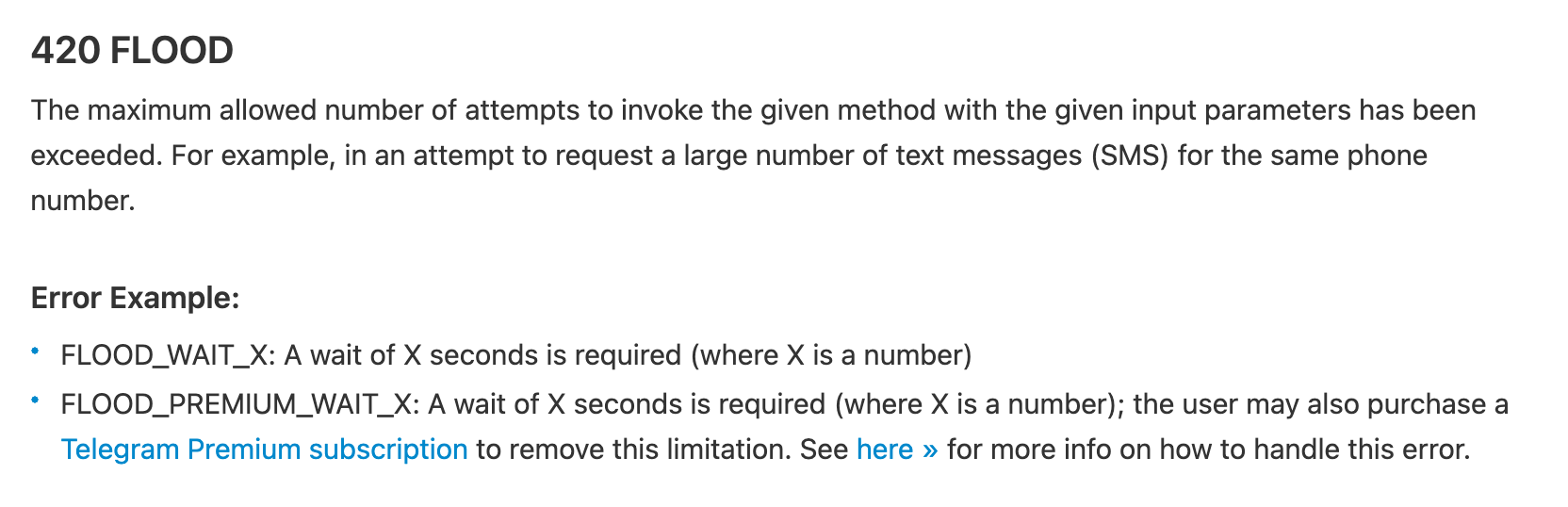
This is the error people panic about most, and it is the mildest one. Telegram defines the 420 family like this:
The maximum allowed number of attempts to invoke the given method with the given input parameters has been exceeded.
Source: core.telegram.org/api/errors
And the error itself:
FLOOD_WAIT_X: A wait of X seconds is required (where X is a number)
Source: core.telegram.org/api/errors
The error database gives the text a person sees:
Please wait %d seconds before repeating the action.
Source: core.telegram.org/api/errors.json (FLOOD_WAIT_%d)
What it means. A "method" is one kind of action, like sending a message or looking up a username. The words "the given method with the given input parameters" put the limit on one action, done with the same details. My reading: if an account looks up 200 usernames in a row, the lookups get a wait. A reply to an existing customer is a different action, so it can still go out. The docs do not promise this in so many words, so treat it as my reading.
One more detail from the database. Most errors list the actions that can cause them. FLOOD_WAIT lists none. The error page explains that an empty list is "for errors that can be emitted by any method". So any action can hit the timer if you repeat it enough.
The number X is the useful part. Telegram tells you exactly how long to wait. A script that waits that long and then tries once is doing what the docs ask. The docs do not say what happens if you retry early. I would not test it on an account you need.
There are two cousins you will meet:
Slowmode is enabled in this chat: wait %d seconds before sending another message to this chat.
Source: core.telegram.org/api/errors.json (SLOWMODE_WAIT_%d)
That one is a group admin's setting. It has nothing to do with your account.
FLOOD_PREMIUM_WAIT_X: A wait of X seconds is required (where X is a number); the user may also purchase a Telegram Premium subscription to remove this limitation.
Source: core.telegram.org/api/errors
The error database lists this one under a single method, upload.getFile, which downloads files. So it is about download speed. Nothing in these sources says Premium lifts spam limits.
What we see in practice. In my experience, FLOOD_WAIT shows up on bulk work: the same lookup or the same join, repeated many times in one sitting. It almost never shows up on normal one-to-one replies. In Entergram, each connected account runs through its own proxy. So 40 accounts in one workspace do not look like 40 accounts on one IP. That protects the accounts. It does not lift the timer. Push one account hard enough and it waits like any other.
What I do:
- I let the timer run out. Then I try once.
- I do bulk work, like lookups and joins, in small batches during the day, not in one burst.
- I find the action that caused the wait and slow down that action only.
Here is the code (or the settings) we use to send messages from Telegram
accounts: {PASTE CODE OR SETTINGS}.

Do this:
1. Find every place where a FLOOD_WAIT or 420 error can happen.
2. Check that the code reads the number of seconds from the error and waits at
   least that long before trying again.
3. Check that it tries again only once or twice, then stops and reports.
4. Find any loop that does the same action many times in a row (lookups, joins)
   and suggest how to slow it down.
5. Show the changes as a short diff, with a one-line reason for each.
-> FLOOD_WAIT tells you exactly how long to wait, so wait that long and slow down the one action that caused it.
Part 3: Login floods are the same timer, on your phone number
The speed check also protects logins. The error database has two you should know:
You asked for the code too many times.
Source: core.telegram.org/api/errors.json (PHONE_NUMBER_FLOOD)
You have tried logging in too many times.
Source: core.telegram.org/api/errors.json (PHONE_PASSWORD_FLOOD)
The error page even uses login codes as its example for 420: "in an attempt to request a large number of text messages (SMS) for the same phone number."
What it means. Logging the same number in again and again is an action like any other. Do it too often and the number has to wait. During that wait, nobody gets back in.
There is one more rule about sessions. A fresh login cannot end older sessions right away:
You can't logout other sessions if less than 24 hours have passed since you logged on the current session.
What we see in practice. We caused this ourselves once. In June our app showed "Reconnect required" on accounts that were actually fine. People pressed Reconnect and logged in again, and some numbers hit FLOOD_WAIT. We fixed the badge and wrote it up in the June update notes. The lesson stuck: when an account looks disconnected, check before you log in again.
What I do:
- One person owns the login for each account. Nobody else retries codes.
- If a login fails twice, I stop and wait. Then I read the error name.
- I keep a note of when each account last logged in, so the 24-hour rule surprises nobody.
-> Repeated logins hit the same timer, so check that the account is really logged out before you log in again.
Part 4: PEER_FLOOD means people reported you, and a moderator agreed
This is the one that hurts. The error database is short:
The current account is spamreported, you cannot execute this action, check @spambot for more info.
Source: core.telegram.org/api/errors.json (PEER_FLOOD)
Its sibling shows up when you try to create a group or channel:
You're spamreported, you can't create channels or chats.
Source: core.telegram.org/api/errors.json (USER_RESTRICTED)
The Spam FAQ explains how an account gets there:
When users press the ‘Report spam’ button in a chat, they forward these messages to our team of moderators for review. If the moderators decide that the messages deserved this, the account becomes limited temporarily.
Source: telegram.org/faq_spam
And what the limit takes away:
This means that if you have been sending unwanted messages to random strangers or posting spam in groups, you lose the ability to do so.
Source: telegram.org/faq_spam
Groups count too, and a person checks every report:
In addition to this, group admins can also report users who post spam in their groups. Naturally, all such reports are also checked by human moderators.
Source: telegram.org/faq_spam
What it means. Read the order of events. A person presses a button. A moderator reviews it. Then the account is limited. Speed does not appear anywhere in that chain. The trigger is people saying they did not want your message.
That is why a proxy does not save you here. A unique proxy per account (Entergram gives every connected account its own) keeps accounts from looking like one machine. It does nothing about a person who presses "Report spam". The person decides.
The good news is in the same FAQ, under the question "So I can't send messages anymore?":
No, it's not that bad. Limited accounts can send messages to people who have their number saved as a contact. You can also always reply to anyone who messages you first.
Source: telegram.org/faq_spam
So a limited account still works for every customer who wrote to you first. Support keeps running. Only first messages to people you do not know stop.
What we see in practice. On a team with many accounts, a limit is often found days late. The account looks normal in the chat list. Replies still go out. Only new conversations fail, and the person on that account thinks people are ignoring them. Seeing every account in one inbox, filtered by account, is how you notice that one account went quiet. That is what we built the Telegram Sales CRM for. It shows you the problem sooner. It does not stop a report.
What I do:
- When one account stops getting answers to first messages, I check it with @SpamBot that day.
- I move that account to replies only until the limit ends.
- I look at what that account sent in the days before. Not at its settings.
-> PEER_FLOOD comes from reports, so change what you send and to whom; a new proxy will not help.
Part 5: People report messages they did not expect
If reports drive limits, the real question is what makes people report. The Spam FAQ opens its answer with one line:
Telegram‘s username search is not a tool for making new friends.
Source: telegram.org/faq_spam
Then it gets specific:
For private messages, it really doesn‘t matter what you send, as long as the receivers find it unwelcome. It could have been a photo, an invite link or a simple ’hello‘.
Source: telegram.org/faq_spam
As a general rule, people do mind getting unsolicited advertisements, links, invite links to groups or channels, random photos and, above all, anything related to commerce or online popularity.
Source: telegram.org/faq_spam
Please only contact people if you're sure that they are expecting messages from you. The same applies to adding people to unwanted groups and channels.
Source: telegram.org/faq_spam
And the Terms of Service, which every account agrees to, put this on the list of things you must not do:
Use our service to send spam or scam users.
Source: telegram.org/tos
What it means. Read that list again as a sales team: advertisements, links, invite links, and "anything related to commerce". That describes most sales messages sent to people who never asked for them. Telegram is telling you, in its own words, that a stranger who gets a pitch is likely to report it. Even a plain hello can be enough.
There is no safe volume in these pages. Ten unwanted messages can get an account limited. A thousand wanted ones will not. The receiver decides what is wanted.
This is also why more accounts do not fix it. Every account carries its own record. Twenty accounts sending messages nobody asked for just means twenty records filling up with reports.
What we see in practice. Two recent requests from our support chats show where the line sits.
A team asked about connecting 20 accounts for 5 people. They wanted staff to message imported customers who had never chatted with them on Telegram. Today the answer is no. In Entergram, broadcasts and newsletters go only to people who already have a chat with the account. Importing a list adds fields to your records. It does not start a conversation. If those people really are your customers, there is a better path, and Telegram points to it. Put your Telegram link in the email or the receipt they already get, and let them write first. The FAQ says you can "always reply to anyone who messages you first".
A seller runs an AI assistant through Telegram Business. They wanted it to follow up with customers who went quiet for 24, 48 and 72 hours. These people had already talked to the seller, so this is the safer side of the line. Still, three follow-ups in three days to someone who stopped answering is how a customer starts to feel chased. A customer can report a chat too. My advice was simple: stop the sequence the moment someone replies, and keep it short.
Where Entergram fits, in our own words:
Entergram is not an outreach tool. It manages conversations that already exist. Broadcasts and newsletters go only to people who already have a chat with your account. Entergram does not support, allow or endorse cold, unsolicited messages to people who have never been in contact with you.
Each broadcast message can be personal per recipient, and replies land in the shared inbox. We do not collect members from groups, and we do not sell contact lists. The full rules are on our acceptable use page.
What I do:
- Before any send, I ask one question per list: did these people write first, or ask to hear from us? If not, they come off the list.
- A follow-up to a quiet customer is one line about them. No link, no invite link, no price.
- I stop every follow-up sequence at the first reply.
- New people get a way to write first: our Telegram link on the site, in emails and on receipts.
I want to send this message from a personal Telegram account to people who
already have a chat with us:

Message: {PASTE MESSAGE}
Who gets it: {DESCRIBE THE LIST, e.g. "customers who wrote to our support
account in the last 90 days"}
When they last wrote to us: {RANGE OF DATES}
How many: {NUMBER}

Telegram's Spam FAQ says people mind "unsolicited advertisements, links, invite
links to groups or channels, random photos and, above all, anything related to
commerce or online popularity".

Do this:
1. Tell me honestly whether these people expect this message. Say why.
2. Point to every part of the message that matches the FAQ list above.
3. Rewrite it as one short line about them, with no link and no price.
4. Suggest what to send only after they reply.
5. If anyone on the list never wrote to us, tell me to take them off it.
-> People report messages they did not expect, so write only to people who already talk to you.
Entergram shows all your Telegram accounts in one inbox, filtered by account. It is free for 3 days, no card.
Part 6: The first limit lasts days, and each one after lasts longer
How long does a limit last? The Spam FAQ gives the only official answer:
If this happened to you for the first time (and you are not an industrial scale spammer), most likely your account will be limited for a few days or so.
Source: telegram.org/faq_spam
And the warning that matters more:
Repeated offences will result in longer periods of being blocked. If you keep writing unwanted messages to strangers, you may lose the ability to do so forever.
Source: telegram.org/faq_spam
If you think it was a mistake:
If you are sure that the limit was wrongfully applied to your account, please contact our @SpamBot.
Source: telegram.org/faq_spam
If you know it was not a mistake and want the limit lifted early, the FAQ asks that exact question. The answer, in full:
We're sorry, but this is impossible. We value the inner peace of Telegram users too much.
Source: telegram.org/faq_spam
And for new accounts that got limited before they sent anything:
Some numbers may trigger an overly harsh response from our system, either due to their previous owners‘ activities or due to them being certain virtual/VOIP numbers.
Source: telegram.org/faq_spam
What it means. Each account has a memory, and each limit is longer than the last. In the end, the account may never be able to start a chat with a stranger again. My reading: an account's clean record is the most valuable thing it has, and every report spends some of it.
The part about numbers matters for teams that buy fresh numbers. Telegram says itself that some recycled or virtual numbers start with a handicap. A cheap number can cost you more than it saves.
What we see in practice. When an account gets limited, the first instinct is to argue with @SpamBot right away. If the account did send unwanted messages, that does not help, and the FAQ says so. Waiting out the first limit and changing what you send is faster. The appeal is for real mistakes, like a new number limited before it sent anything.
What I do:
- I send /start to @SpamBot from the limited account and save the reply with the date.
- If the limit was earned, I wait it out and move that account to replies only.
- If it was a real mistake, I send a short, honest appeal: who we are and what the account does.
- I log every limit per account, so I know which accounts already have a history.
One of our Telegram accounts was limited. Facts:
- What the account is used for: {SALES, SUPPORT, ...}
- What it sent in the 7 days before the limit: {DESCRIBE, WITH COUNTS}
- What @SpamBot replied: {PASTE REPLY}
- Has this account been limited before: {YES OR NO, WHEN}

Do this:
1. Based on Telegram's Spam FAQ, tell me if this limit was likely earned or a
   likely mistake. Explain in two sentences.
2. If earned: write a plan for the next 2 weeks for this account (what it may
   and may not send).
3. If a likely mistake: draft a short, honest message to @SpamBot, under 80
   words, with no promises we cannot keep and no exaggeration.
4. List what we should change in our sending so it does not happen again.
-> Every limit makes the next one longer, so treat each account's record as something you spend and cannot buy back.
Part 7: Frozen and banned are a different level, and the clock runs against you
Above limits there are two harder outcomes. The login docs explain frozen accounts:
Accounts can be frozen for serious violations of Telegram's ToS.
Source: core.telegram.org/api/auth
Frozen accounts are in read-only mode
Source: core.telegram.org/api/auth
Frozen accounts are deleted after a specific amount of time, unless an appeal is submitted and accepted.
Source: core.telegram.org/api/auth
The same section names three things the app receives. They are when the account was frozen (freeze_since_date), when it will be deleted (freeze_until_date) and where to appeal (freeze_appeal_url). So a frozen account has a deadline, and the appeal is the only way past it.
A ban is the end state:
The current account was deleted and banned by Telegram's antispam system.
Source: core.telegram.org/api/errors.json (USER_DEACTIVATED_BAN)
Then there is the part every team using a third-party app should read. Telegram's page for app developers says:
If you use the Telegram API for flooding, spamming, faking subscriber and view counters of channels, you will be banned forever.
Due to excessive abuse of the Telegram API, all accounts that log in using unofficial Telegram API clients are automatically put under observation to avoid violations of the Terms of Service.
What it means. Any app that logs in to your account through the user API, Entergram included, counts as one of the "unofficial Telegram API clients" in that line. Telegram watches those accounts more closely. I am not going to pretend otherwise. What the docs punish is flooding, spam and fake counters. A team that uses a client to answer customers and manage deals does none of those. A team that uses one to pitch strangers does, and no client will protect it.
The same page also gives a way back if you were banned without breaking the rules:
If you didn't violate the Terms of Service but your account does get banned after using the API, write to recover@telegram.org explaining what you intend to do with the API, asking to unban your account.
What we see in practice. Our zero-bans figure covers accounts that teams use for their own conversations, which is the only use we support. If an account is already frozen, read Telegram account frozen, banned or spam limited. It covers the deletion date, the appeal, and what to save while the account is read-only. For the setup side of running many accounts, see how to manage 10+ Telegram accounts without getting banned.
What I do:
- When an account goes read-only, I open the appeal link that day. The deletion date is real.
- I save what I need from a frozen account while it can still be read.
- I never use a client, script or service for fake views, fake members or mass invites. The docs say "banned forever" for that, and they mean it.
-> A frozen account has a deletion date, so appeal the same day, and never use any tool for flooding.
Part 8: A logged-out session is not a ban
The last group of errors scares people for no reason. They come from the door, not the judge. From the error page:
SESSION_REVOKED: The authorization has been invalidated, because of the user terminating all sessions
Source: core.telegram.org/api/errors
And from the error database:
Concurrent usage of the current session from multiple connections was detected, the current session was invalidated by the server for security reasons!
Source: core.telegram.org/api/errors.json (AUTH_KEY_DUPLICATED)
The error page says when that one fires. It happens when a server "detects that an authorized session is sending requests in parallel from two separate TCP connections, from the same or different IP addresses."
The third one you may meet:
The specified authorization key is not registered in the system (for example, a PFS temporary key has expired).
Source: core.telegram.org/api/errors.json (AUTH_KEY_UNREGISTERED)
The database lists that error under 741 different methods. In plain words: almost any action can tell you the session is gone.
What it means. A session is one logged-in device or app. Someone on the team may press "Terminate all other sessions" in Telegram settings. Then every other session dies, including the one in your CRM. If the same session runs in two places at once, Telegram ends it for safety. So never load one session into two tools at the same time. None of this says anything bad about the account. You log in again and carry on.
Mind Part 3: repeated logins hit the login timer, so find the cause first.
There is one more door. Accounts that stay offline too long are deleted:
If you stop using Telegram and don't come online for at least 18 months, your account will be deleted along with all messages, media, contacts and every other piece of data you store in the Telegram cloud.
Source: telegram.org/faq
The same answer goes on: "You can change the exact period after which your inactive account will self-destruct in Settings." So 18 months is only the default. That matters for spare accounts nobody opens.
What we see in practice. We had a bug of our own here. Telegram told our app that a session key was no longer registered. Our app marked the account as "degraded" instead of asking for a new login. A background job kept retrying it. We fixed that in October. The account was never in trouble with Telegram. Our app just did not take the hint fast enough.
Entergram mirrors Telegram, so your team can keep using the Telegram app next to it and switch at any time. That is a normal, separate session. The thing to avoid is someone pressing "Terminate all other sessions" to tidy up their phone.
What I do:
- I tell the team: never press "Terminate all other sessions" on a work account without asking.
- I never load one session into two tools at once.
- Once a month I open Settings, then Devices, on each work account and end sessions I do not recognise.
- I open spare accounts now and then, or set their self-destruct period longer.
We run {NUMBER} Telegram accounts. For each one I will paste the list of active
sessions from Settings, then Devices (device, app, place, last active).

{PASTE LISTS, ONE BLOCK PER ACCOUNT LABEL}

Our approved apps and places are: {LIST, e.g. "Telegram Desktop in our office,
our CRM, the account owner's phone"}.

Do this:
1. For each account, list sessions that are not on the approved list.
2. Mark sessions not active for more than 30 days.
3. Tell me which sessions to end, and remind me that a session less than 24
   hours old cannot end other sessions.
4. Flag any account that has not been online for a long time, given that
   Telegram deletes accounts after a long time offline.
-> A dead session needs one careful login, so do not treat it as a ban or let anyone end all sessions.
Myths, settled
"A proxy per account stops spam limits." False. A proxy changes where traffic comes from. Limits come from reports that people review: "When users press the ‘Report spam’ button in a chat, they forward these messages to our team of moderators for review." (Spam FAQ)
"FLOOD_WAIT means the account is banned." False. It is a timer: "FLOOD_WAIT_X: A wait of X seconds is required (where X is a number)". (Error handling)
"A plain hello is too small to get reported." False. The FAQ lists what people report, and the list ends with "a simple ’hello‘". (Spam FAQ)
"Support will lift a limit early if you ask nicely." False. The FAQ's answer to that exact request: "We're sorry, but this is impossible." (Spam FAQ)
"Brand new accounts get limited for no reason." Half true. It happens, and Telegram says why: "Some numbers may trigger an overly harsh response from our system, either due to their previous owners‘ activities or due to them being certain virtual/VOIP numbers." (Spam FAQ) Blame the number's past, not the account.
"Telegram does not notice third-party apps." False. Telegram says "all accounts that log in using unofficial Telegram API clients are automatically put under observation to avoid violations of the Terms of Service." (Obtaining api_id)
The 20-minute check
Run this on your own accounts today. You need Telegram and a notepad.
- Minutes 0 to 5: list your accounts (Part 1). Write down every work account, who owns it, and what it is for: sales, support, or spare.
- Minutes 5 to 10: ask @SpamBot (Parts 4 and 6). From each account that starts new chats, send /start to @SpamBot. Write down which ones are limited, and until when.
- Minutes 10 to 13: check sessions (Part 8). On each account, open Settings, then Devices. End anything you do not recognise. Note which accounts nobody has opened in months.
- Minutes 13 to 17: read your last first messages (Part 5). Open the last message each account sent to someone new. Does it have a link, an invite link or a price? Did the person expect it? Mark each one yes or no.
- Minutes 17 to 20: check your retry rules (Parts 2 and 3). Ask whoever runs your scripts or tools: when Telegram says wait X seconds, do we wait that long? Write the answer down.
What I would do this week
- Monday: Run the 20-minute check. Move any limited account to replies only.
- Tuesday: Go through your lists. Remove anyone who never wrote to you or asked to hear from you. Note where each list came from.
- Wednesday: Give new people a way to write first. Put your Telegram link on the site, in your emails and on your receipts.
- Thursday: Fix retries in your tools so they wait the seconds Telegram gives, then stop.
- Friday: Write a one-page team rule: who logs in to which account, who may end sessions, and what to do with an error name.
What not to touch: do not delete and re-create a limited account, and do not log in to it again and again. Neither one lifts the limit, and repeated logins hit the timer from Part 3.
What this does not prove
- No thresholds. Telegram publishes error names, not numbers. Nothing here tells you how many messages a day are safe.
- Dates. I read every page on 9 November 2026 and re-checked the quotes on 14 November 2026. The error database was at layer 227. These pages change without notice.
- What moderators actually do. The Spam FAQ describes reports and review. It does not say how many reports it takes, or what else the system looks at. Anything beyond the quoted text is my reading.
- Per-action limits. The words "the given method with the given input parameters" are my only basis for saying limits sit on actions. The docs do not list which actions share a limit.
- Our numbers. Zero bans in 6 months is Entergram's own product data, checked in October 2026. It is not audited, and it is not a promise for your account.
- Telegram Business and bots. Business chat bots and the Bot API have their own rules. This post is about personal accounts only.
Glossary
- API: the way an app talks to Telegram's servers. Every Telegram app, official or not, uses it.
- MTProto: the name of Telegram's own protocol. "MTProto API" means the full user API that apps like Telegram Desktop use.
- Method: one action in the API, such as sending a message or looking up a username.
- FLOOD_WAIT: "you did this too often, wait X seconds". It is a timer and ends on its own.
- PEER_FLOOD: "this account was reported for spam". A limited account can only message contacts and reply.
- @SpamBot: Telegram's official bot that tells you if your account is limited and takes appeals.
- Frozen account: read-only, with a deletion date unless an appeal is accepted.
- Session: one logged-in device or app on an account. You see them in Settings, then Devices.
- Unofficial client: any app that is not made by Telegram and logs in to your account. CRMs that use real accounts are in this group.
FAQ
What does FLOOD_WAIT mean on Telegram?
It means the account did one action too many times, too fast. Telegram tells you how many seconds to wait. After that, the action works again. It is not a ban.
What is PEER_FLOOD and how long does it last?
PEER_FLOOD means people reported your messages as spam and a moderator agreed. Telegram's Spam FAQ says a first limit usually lasts "a few days or so". Each repeat lasts longer.
Can I still use a limited Telegram account for support?
Yes. A limited account can still message people who saved its number as a contact. It can also always reply to anyone who wrote first. That covers most support work.
Do proxies or extra accounts prevent Telegram spam limits?
No. Limits come from people pressing "Report spam" and a moderator agreeing. A proxy only changes where your traffic comes from. Extra accounts each carry their own record, so unwanted messages from 20 accounts just mean 20 accounts with reports.
Does using a third-party Telegram client get my account banned?
Not by itself. Telegram says it watches accounts on unofficial clients more closely. It bans accounts that use the API for flooding, spam or fake counters. Normal conversations are not on that list.
How do I appeal a Telegram spam limit?
Open @SpamBot from the limited account and send /start. If the limit was a mistake, explain briefly and honestly. If you did send unwanted messages, Telegram says it will not lift the limit early.
Is a "session revoked" error a ban?
No. It means someone ended that session, or the same session was used from two places at once. Log in again, carefully, and find out who ended it.
Entergram, the Telegram CRM I build for teams that run many accounts, is free for 3 days, no card.
Ready to upgrade your Telegram workflow?
Don't waste another lead. Don't lose another message.
Get started with Entergram